
Abstract
The choice of Microsoft 365 cloud environment affects the capabilities an organization can deploy, the applications it can integrate, and the experience of its users and administrators. This whitepaper provides a practical technical and operational comparison of Microsoft 365 Commercial, Government Community Cloud, and Government Community Cloud High for organizations evaluating tenant selection or migration.
Organized around familiar Microsoft services, the paper examines licensing, cloud and identity boundaries, external collaboration, the core productivity applications and third-party integrations. It focuses on differences that materially affect implementation and daily operations, including configuration requirements, supported alternatives and dependencies that influence the effort needed to deliver business workflows. A high-level overview of compliance considerations establishes context for tenant selection, while supporting administration, endpoint management and security differences are covered in the appendices. Detailed regulatory analysis remains outside the paper's scope.
The migration and coexistence discussion considers the implications of a full tenant migration, an organization-owned government enclave and a provider-managed government enclave, including identity design, user experience, and ongoing administration. The objective is to help technical leaders and implementers identify consequential limitations, assess operational tradeoffs, and select an environment that supports their organization's current requirements and anticipated needs.
1 Introduction and Scope
Purpose and Audience
For many organizations, the decision to move to GCC or GCC High begins with an upcoming contract or a requirement to handle certain types of information. The discussion then tends to center on whether the environment meets those requirements. What can receive less attention is how that choice changes the work users and administrators do every day. Familiar applications may behave differently, and connections that previously felt routine may require additional planning or a different approach.
This paper is intended for technical leaders, administrators and implementers responsible for selecting, deploying or supporting M365. The aim is to help evaluate those consequences before committing to a tenant or migration approach. The differences discussed should also help organizations account for the implementation and ongoing operational effort associated with the opportunities they pursue.
Scope and Basis for Comparison
This paper compares M365 Commercial, GCC and GCC High, starting with a high-level compliance overview, cloud architecture and licensing. The main service discussion covers Entra ID, Teams, SharePoint and OneDrive, Exchange Online and Outlook, and representative third-party integrations. The migration section then evaluates full migration, organization-owned and provider-managed government enclaves, including identity design and selected Google Workspace coexistence scenarios. Supporting comparisons of the admin center, Intune, Purview and Defender are included in Appendices A through D.
Detailed regulatory analysis, a complete service feature inventory and migration cutover procedures are outside the scope of this paper. Product availability and vendor support can change, so the references identify the sources used for the comparisons. Organizations should validate their required workflows against the intended deployment before committing to a move.
2 High Level Compliance Differences
While an entire whitepaper could be written on the compliance differences between Commercial, GCC and GCC High, this is already one of the most explored parts of the tenant decision. This section provides a baseline understanding of the three offerings. For a deeper understanding, Automata strongly recommends Richard Wakeman's article, Understanding Compliance Between Commercial, Government, DoD & Secret Offerings, published in Microsoft's Public Sector Blog. [1]
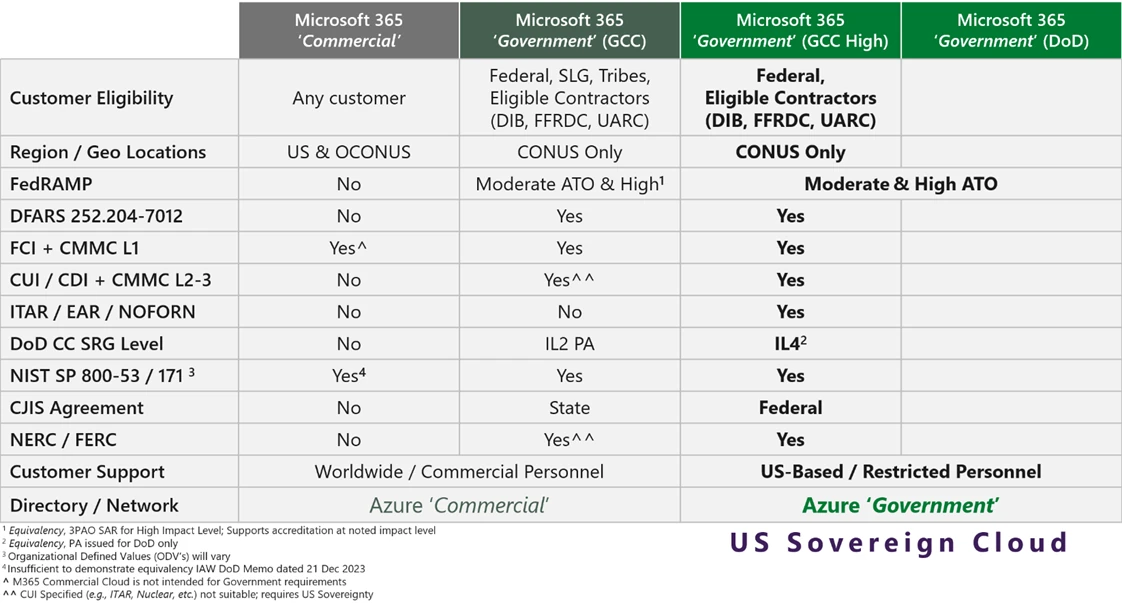 Open full size (opens in a new tab)
Without going too deep into the history of the FedRAMP packages for GCC and GCC High, there have been several changes over the past few years that have made this comparison difficult to follow. GCC’s Moderate package dates back to 2014, while Microsoft’s earlier guidance for GCC High emphasized FedRAMP High equivalency and existing agency ATOs. The picture changed when GCC High gained FedRAMP High recognition in the Marketplace in December 2024. The package names have also changed. In July 2025, Microsoft renamed GCC’s existing package from “Office 365 Multi-Tenant & Supporting Services” to “Microsoft 365 Government Community Cloud & Supporting Services,” while confirming that its service boundary and control scope had not changed. As of 10 October 2026, GCC’s existing package remains certified at Class C (Formerly FedRAMP Moderate), alongside a separate GCC package that has been In Process for Class D High (Formerly FedRAMP High) since 20 July 2026. With different package names, assessment claims and Marketplace milestones, it is easy to see why the history has caused confusion. [5], [6], [7], [2], [1]
For organizations working in the FedRAMP world, the tenant decision also depends on where Microsoft 365 fits into the federal system. Azure Commercial has its own FedRAMP High provisional authorization for services within its published scope. That coverage does not carry over to Teams, SharePoint or Exchange in M365 Commercial. A separate Commercial tenant may still work for corporate activity outside the federal system, but simply keeping federal data in Azure is not enough to settle the question. Organizations also need to look at the identity, security logging, administration and integrations that support the federal system. [9], [1], [2]
CMMC is where the discussion becomes more complicated. CMMC and FedRAMP have different scopes and should not be treated as interchangeable. For CMMC Level 2, the scope includes both assets that handle controlled unclassified information, or CUI, and assets that protect the assessed environment. That means a service can still matter to an organization’s assessment even if it never holds CUI. Choosing GCC High also does not make the organization CMMC certified. [10], [3]
DFARS 252.204-7012 adds another part of the picture. For covered contractor systems subject to paragraph b.2, the contractor must require and ensure that an external cloud provider storing, processing or transmitting covered defense information in contract performance meets security requirements equivalent to FedRAMP Moderate. [11]
At first glance, that might make the choice between GCC and GCC High seem straightforward. Both hold FedRAMP Certifications at Class C (Formerly FedRAMP Moderate) or higher, which might suggest that either would be a valid option for handling CUI. But as with many things Microsoft, it is not quite that simple. This is where Richard Wakeman's article provides further context. Rather than repeat an entire paper on CUI categories, this section uses Microsoft's own summary: “Controlled Unclassified Information is a Maybe in GCC”. [1]
While GCC may work for organizations handling CUI Basic or certain types of CUI Specified, the specific requirements attached to that information still matter. Microsoft does not offer native ITAR or EAR export-control commitments for GCC and recommends GCC High for broader CUI coverage at CMMC Levels 2 and 3. Among the three offerings discussed here, Microsoft provides ITAR contract language only for GCC High and recommends it for protecting all CUI categories, subject to applicable service scope and handling requirements. [1], [4]
3 Cloud Architecture and Service Boundaries
Moving on from the “High Level” overview of compliance, this section examines the just as confusing infrastructure relationships between the three M365 environments. Fortunately, the Automata team has had plenty of experience living in all three. Many of the differences organizations experience between them come back to their underlying infrastructure and service boundaries. As one may already be aware, M365 runs on Microsoft’s own Azure cloud infrastructure.
Organizations researching the infrastructure differences between Azure and M365 environments may have come across Figure 2 in Microsoft’s documentation, Cloud feature availability for US Government customers. [12]
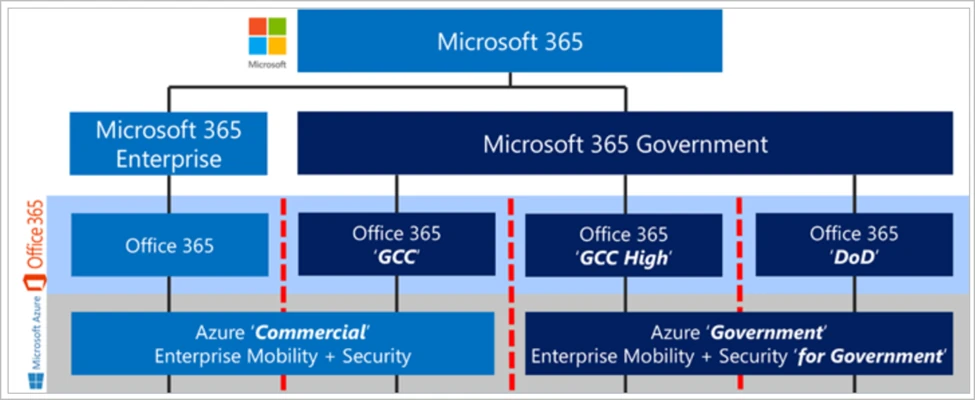
This diagram helps illustrate the distinction between M365 and O365 as product suites. Office 365 provides the productivity and collaboration services discussed here, while Microsoft 365 enterprise and government suites bundle those services with additional identity, device management capabilities, and Windows entitlements. [13] It also reveals the most fundamental relationship to take away from this section:
- The core Office 365 workloads in Commercial and GCC run on Azure Commercial infrastructure and are paired with commercial Entra ID. GCC is a segregated government data enclave within that environment. [1], [12]
- The core Office 365 workloads in GCC High run on Azure Government infrastructure and are paired with government Entra ID. [12]
In practice, this one fact has enormous consequences for those hosting their workloads in Azure. If an organization wants M365 and its Azure subscriptions to share a single Entra ID tenant, then its choice of cloud environments is effectively a package deal. For one shared directory with Azure Commercial, the choice is between M365 Commercial and GCC. For one shared directory with Azure Government, the offering in scope here is M365 GCC High. The third option is to run across both clouds, such as Azure Commercial alongside M365 GCC High. This means the organization ends up managing separate commercial and government Entra ID tenants. Cross-cloud B2B collaboration and synchronization can ease access and provisioning, but at the end of the day the organization still has two directories to manage. All three paths have various pros and cons, which are evaluated further within this paper. [14], [15]
At this point, the discussion could expand into just how different Azure Commercial and Azure Government are, but that is a topic Automata will discuss in a future paper as it is far too complex to fit into this one. The short version is that the clouds share underlying technologies, but service availability, features and configurations can differ. In Automata’s experience, Azure Government can feel behind Azure Commercial for organizations used to Commercial’s newer capabilities. [16]
4 Licensing and Procurement
This section covers possibly everyone’s favorite part of buying from Microsoft, licensing. If the different license tiers available in Commercial were not already confusing, getting onto GCC or GCC High is a whole other beast of its own. Purchasing M365 Commercial or standing up an Azure Commercial tenant is fairly straightforward. Organizations can buy directly from Microsoft and set it up.
On the government side of the house, it is not that simple. Both GCC and GCC High require eligibility validation. GCC High purchases go through an Enterprise Agreement or an approved AOS-G licensing partner. GCC has more purchasing channels, including Web Direct and Cloud Solution Provider partners. [17] Organizations purchasing through a reseller have to pick one, reach out, negotiate their licenses and get onboarded through them. The time required to complete this process can vary by reseller and purchasing arrangement. Organizations that need to onboard onto M365 GCC or GCC High on short notice should revisit the proposed timeline with their teams to ensure it accounts for these procurement dependencies.
Between completing the eligibility form, selecting a reseller, negotiating with them and waiting for licenses, it is worth planning in weeks rather than days, with room for months if validation or procurement drags out. Organizations should confirm the expected timeline with their partner. Alongside this, they should check the commitment they are signing up for. An annual commitment paid monthly is still an annual commitment. GCC has new commerce purchasing options through CSP, and available terms depend on the specific product. For GCC High, organizations should confirm the term and cancellation conditions in their agreement rather than expecting Commercial’s month to month flexibility. [18], [19]
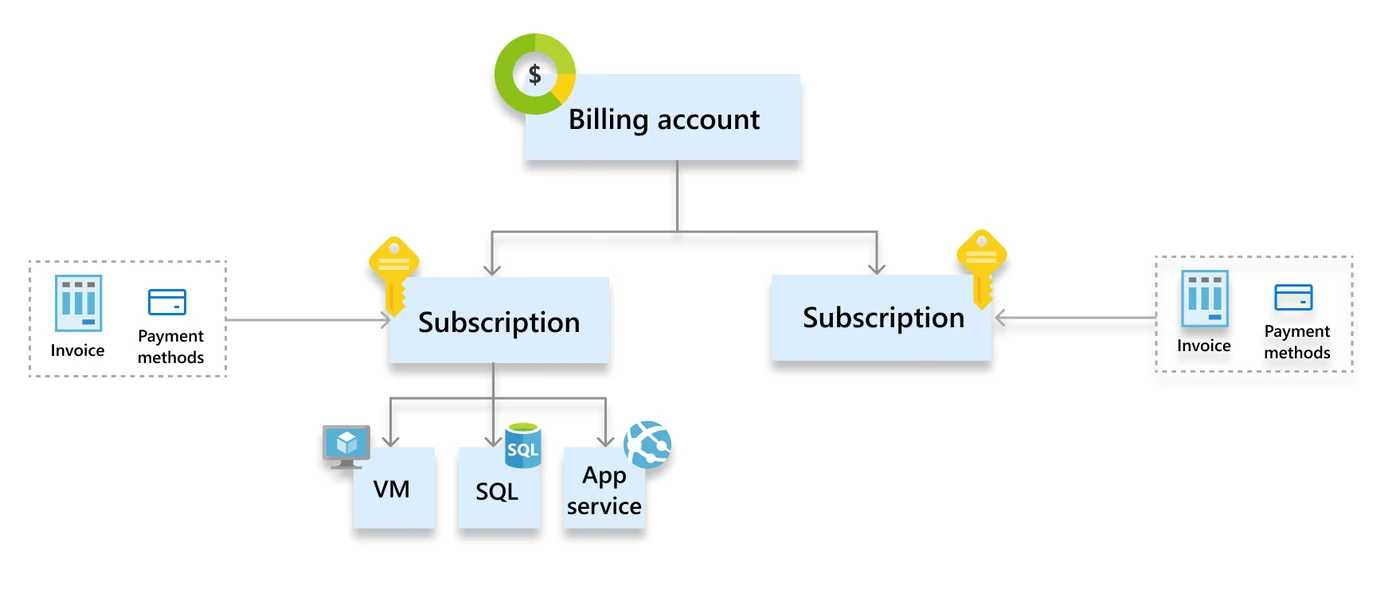
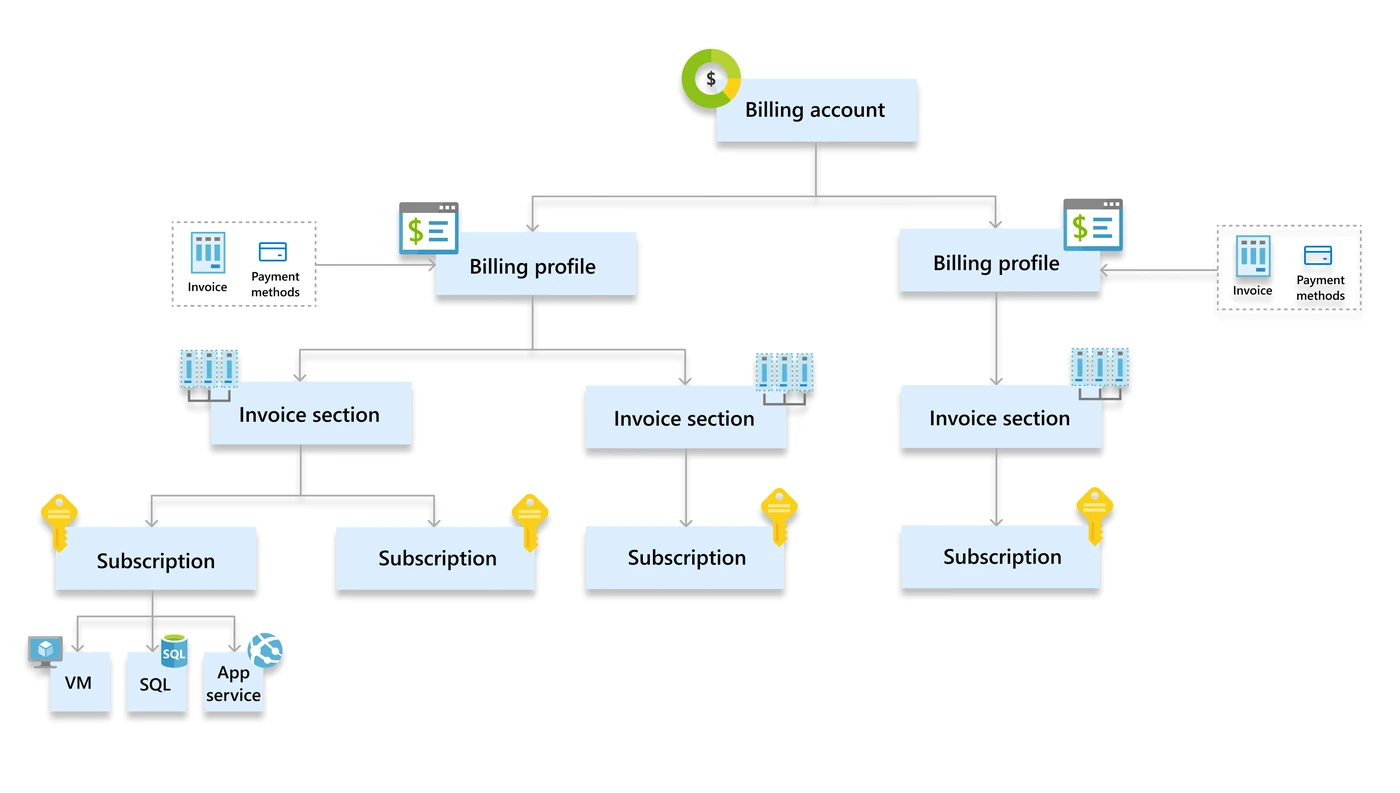
Beyond that, there are actual technical impacts to the licensing and billing differences between what organizations might have available in Commercial and Government. In the M365 admin center, two billing account types organizations may come across are the legacy Microsoft Online Subscription Agreement, or MOSA, and the Microsoft Customer Agreement, or MCA. These billing account labels do not cover every purchasing agreement, including the Enterprise Agreement and AOS-G routes used for GCC High. The purchasing channel and billing account both matter. [17], [20]
While that may not sound consequential, there are real impacts. Organizations expecting to move from Commercial to Government and find the same billing profiles should check their billing account first. In the M365 admin center, those profiles are an MCA billing account feature, not a feature of the license itself. [21]
It can also affect the APIs available to the organization, but for Azure this comes down to its Azure billing arrangement. Organizations that deployed their Azure subscriptions and management groups through Infrastructure as Code from the beginning may encounter limitations when trying to mirror that setup onto an unsupported billing offer during a move to Azure Government. Microsoft documents programmatic subscription creation for Enterprise Agreement, MCA and MPA billing accounts, but not Microsoft Online Services Program pay-as-you-go accounts, or MOSP. Azure Government supports subscription creation automation under supported arrangements, so organizations should check their offer and permissions before assuming the same deployment will work. [22], [23]
MOSP | Microsoft Online Services Program
MCA | Microsoft Customer Agreement
5 Microsoft Entra ID
With compliance, architecture and licensing covered, the discussion can now turn to the nuances of the individual M365 services, beginning with Entra ID. Additional administration, device management and security considerations are covered in Appendices A through D.
Authentication Federation and Provisioning
When it comes to authentication, federation and provisioning, most of the fundamentals are familiar across all three offerings. Microsoft lists cloud authentication, federation with other identity providers, single sign-on and automated user and group provisioning as available in Azure Government. Entra Connect sync and cloud sync are also supported, so GCC High retains the core capabilities used to connect on-premises identities and applications to Entra ID. [43]
The most practical difference is which Entra cloud the tenant uses. As covered earlier, Commercial and GCC use Azure Commercial’s Entra ID, while GCC High uses Azure Government’s instance. For OAuth and OpenID Connect integrations, that means using the government authentication endpoint at login.microsoftonline.us rather than login.microsoftonline.com. Applications also need to be registered in the appropriate cloud. This is something to check early when evaluating an application or moving an existing integration into GCC High. [42]
Hybrid deployments also need the appropriate government configuration. Microsoft documents specific installation settings and network destinations for pass-through authentication agents and Application Proxy connectors, along with a separate seamless single sign-on endpoint. Beyond those differences, application compatibility needs to be evaluated individually. Microsoft supporting single sign-on or automated provisioning in Government does not establish that every vendor’s integration supports it. Single sign-on and provisioning should each be checked, since they are separate integrations and may have different support. These vendor and application considerations are covered further in the Third Party Integrations section. [43], [44]
External and Cross Tenant Access
External collaboration is where the cloud relationships discussed earlier start to become immediately noticeable. For those used to Commercial, sharing a document, joining a customer’s Teams meeting or working in another organization’s channel can feel fairly routine. In GCC and GCC High, those same tasks can involve different access models and additional configuration.
Before getting into the individual services, it helps to distinguish the identity models below. Configuring one does not automatically make the others work.
| Mechanism | What it does | Important cloud distinction |
|---|---|---|
| B2B collaboration | Creates an external user representation in the resource tenant | Supported between public Azure and Azure Government with explicit cross-cloud configuration |
| B2B direct connect | Provides Teams shared channel collaboration without creating a guest object | Teams shared channels are unavailable in GCC High and DoW. Commercial-to-GCC shared channels are also unsupported. |
| Cross-tenant synchronization | Automates the lifecycle of B2B users in another tenant | Cross-cloud user synchronization is supported, with additional licensing and limitations |
Sources: Microsoft Entra and Teams guidance on the access models and cloud limitations. [33], [34], [35], [36], [40], [41]
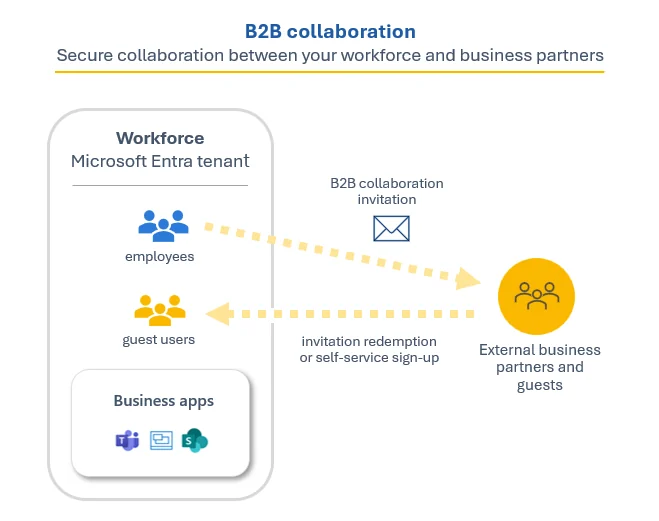
With B2B collaboration, the user signs in with their home organization’s credentials, while the organization sharing the resource maintains a guest object representing them. So being a guest does not necessarily mean another username and password to manage. This is the model behind many authenticated SharePoint, OneDrive and Teams guest-access workflows. [33], [35]
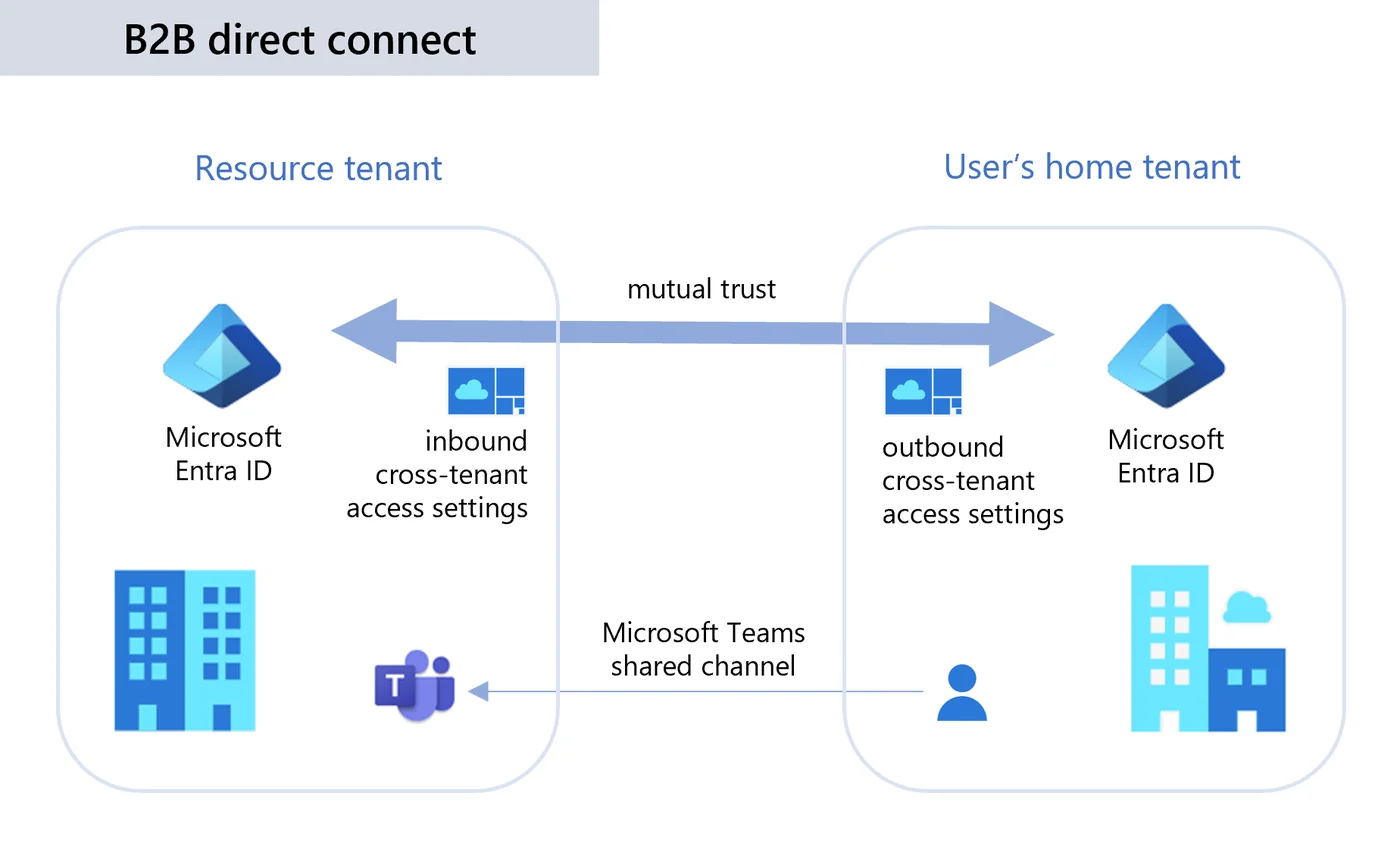
B2B direct connect takes a different approach. It supports Teams shared channels without creating a guest object in the other organization’s tenant. The user stays in their home Teams environment, but both organizations must allow the relationship. This capability has important limits. Microsoft currently lists shared channels as unavailable in GCC High and DoW. Shared channels between Commercial and GCC are also unsupported, despite both using public-cloud Entra ID. The diagram shows the model for supported environments. [34], [40], [41]
Cross-tenant synchronization builds on B2B collaboration by automating the creation, updating and removal of external users in another tenant within the same organization. Administrators can select the users who need access rather than manually inviting and maintaining each account. With automatic redemption configured, users can access assigned resources without individually accepting an invitation, while continuing to sign in through their home tenant. Permissions and application access still need to be configured. [36], [179]
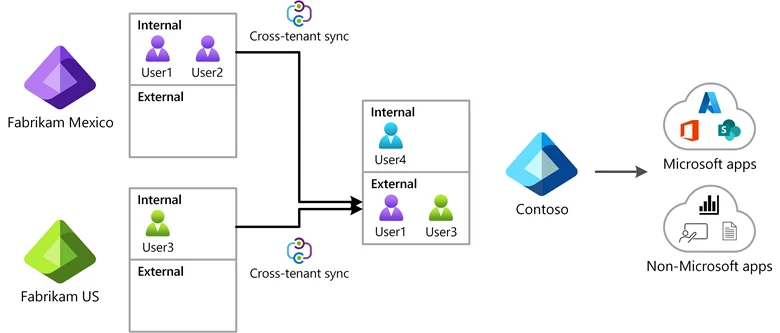
Between Commercial or GCC and GCC High, Microsoft calls this cross-cloud synchronization. User synchronization is supported in either direction, with each direction configured separately and the required cross-cloud settings and licensing. New accounts default to external Member, but can be configured as external Guest. For Teams guest collaboration across clouds, Microsoft requires Guest. Synchronization does not move files, provide a usable destination Outlook mailbox or remove other B2B workload restrictions. Section 10 revisits these account differences and their implications for a government enclave. [36], [148], [149]
Another common pitfall is thinking that once these Entra ID settings are configured, every type of M365 collaboration will work. Teams, SharePoint and OneDrive have their own configurations and limitations to account for. The next table connects the identity models to the tasks users actually perform when working with another organization.
| Experience | Mechanism | Commercial or GCC ↔ GCC High |
|---|---|---|
| Access an externally shared SharePoint site, document or OneDrive folder | Usually Entra B2B collaboration, with a guest representation | Supported with cross-cloud configuration and appropriate sharing policies |
| Access assigned resources with a home account, without accepting individual invitations | Cross-tenant synchronization, with automatic redemption | Supported with cross-cloud configuration and licensing. B2B limitations remain. Cross-cloud Teams team and channel access requires Guest. |
| Participate in another organization’s Teams shared channel, including its channel resources | B2B direct connect, without a guest object | Unavailable. Teams shared channels are not supported in GCC High or DoW. |
| Join a Teams meeting as an authenticated participant without a guest account | Teams cross-cloud meeting connection | Supported when both organizations configure the relationship |
| Sync another organization’s shared SharePoint or OneDrive content through the OneDrive client | B2B Sync, using guest access | Requires identities and content to be in the same Azure cloud |
Sources: Microsoft guidance on cross-cloud collaboration, synchronization, shared channels, Teams meetings and OneDrive B2B Sync. [35], [37], [38], [40], [36], [149], [179]
The practical impact is that receiving an invitation does not guarantee users can join a new partner’s Teams meeting with their organizational identity. Joining without a guest account is possible, but both organizations must configure the cross-cloud meeting connection ahead of time. This can mean coordinating with the other organization’s IT team before the first meeting. Once configured, that relationship can support later meetings, but each new partner can introduce the same administrative work. [37]
This also applies when the organizations share an Azure cloud. GCC High and DoW both use Azure Government, while Commercial and GCC both use Azure Commercial. They still remain separate M365 cloud environments for Teams meetings. Organizations that collaborate primarily with partners in another environment should account for that additional coordination when choosing a tenant. [37]
Anonymous participation may provide a fallback if the host allows it, although the user is not joining as an authenticated organizational participant. If anonymous access is blocked and the relationship is not configured, an unexpected meeting can quickly become an IT coordination exercise. [37], [39]
Identity Recovery and Feature Availability
The core identity governance capabilities, including Privileged Identity Management, access reviews and entitlement management, are available in Azure Government. The features an organization can use still depend on the licenses purchased, but choosing GCC High does not mean giving up those core controls. [43]
Recovery is another area where it helps to be clear about what Microsoft actually provides. Restoring a deleted user is different from undoing changes to a Conditional Access policy or application configuration. Microsoft documents a 30-day restoration window for supported soft-deleted objects, and its restoration API is available in government clouds. Its native recovery-snapshot API, however, is available in the global service but not the government deployments used by GCC High and DoW. For GCC High, organizations should check their intended recovery route and integrations rather than assuming Commercial’s experience carries over. Directory recovery is also separate from backing up Exchange, SharePoint or OneDrive content. [45], [46]
Finally, Global Secure Access introduces a more straightforward difference. Microsoft currently supports it in Commercial and GCC, but not GCC High or DoW. Organizations using Entra Internet Access or Private Access in Commercial need to revisit that part of their environment before moving to GCC High. Organizations should plan for an available alternative before assuming those services will carry over. [47]
6 Microsoft Teams
With the identity requirements covered, the discussion now turns to how those differences affect Teams itself. The access models and cross-cloud setup are covered in the Entra ID section. This section focuses on what users and administrators notice once they begin using the service.
External Collaboration and Meetings
External chat is one of the more noticeable differences. Commercial and GCC users can have the native Teams chat experience with each other when both use Teams-only mode and external access is allowed. Between Commercial or GCC and GCC High, that experience is limited to text-only chat. The same limitation applies between GCC High and DoW, despite both using Azure Government. This matters for organizations that rely on external chat for day-to-day coordination rather than just scheduling a meeting. [48]
Guest access gives users access to the other organization’s teams and channels, but they work within that organization’s Teams context. That can mean switching organizations to find shared content or previous meeting chats. It also affects meeting access. Microsoft states that users already invited as guests must join through their guest account rather than the authenticated cross-cloud meeting connection. Before joining, users should check the account and organization shown on the pre-join screen. [37], [49]
The client users choose also changes the experience. A browser can be a useful way into a meeting, but it does not provide every capability available in the desktop application.
| Client | Practical differences |
|---|---|
| Desktop | Users should check the selected account and organization before joining. If a redeemed guest organization does not appear, Microsoft recommends restarting Teams. |
| Desktop browser | Supports guest tenant switching, but lacks simultaneous activity and notifications across tenants. Giving or taking screen-sharing control and creating or managing breakout rooms are also unavailable. |
| Mobile | Users should use the Teams mobile application. Teams for Web is unsupported in mobile browsers. Account selection and anonymous joining depend on the meeting’s access policies. |
Sources: Microsoft guidance on joining outside the organization, Teams for Web and meeting access. [49], [50], [51], [52]
Telephony and Teams Rooms
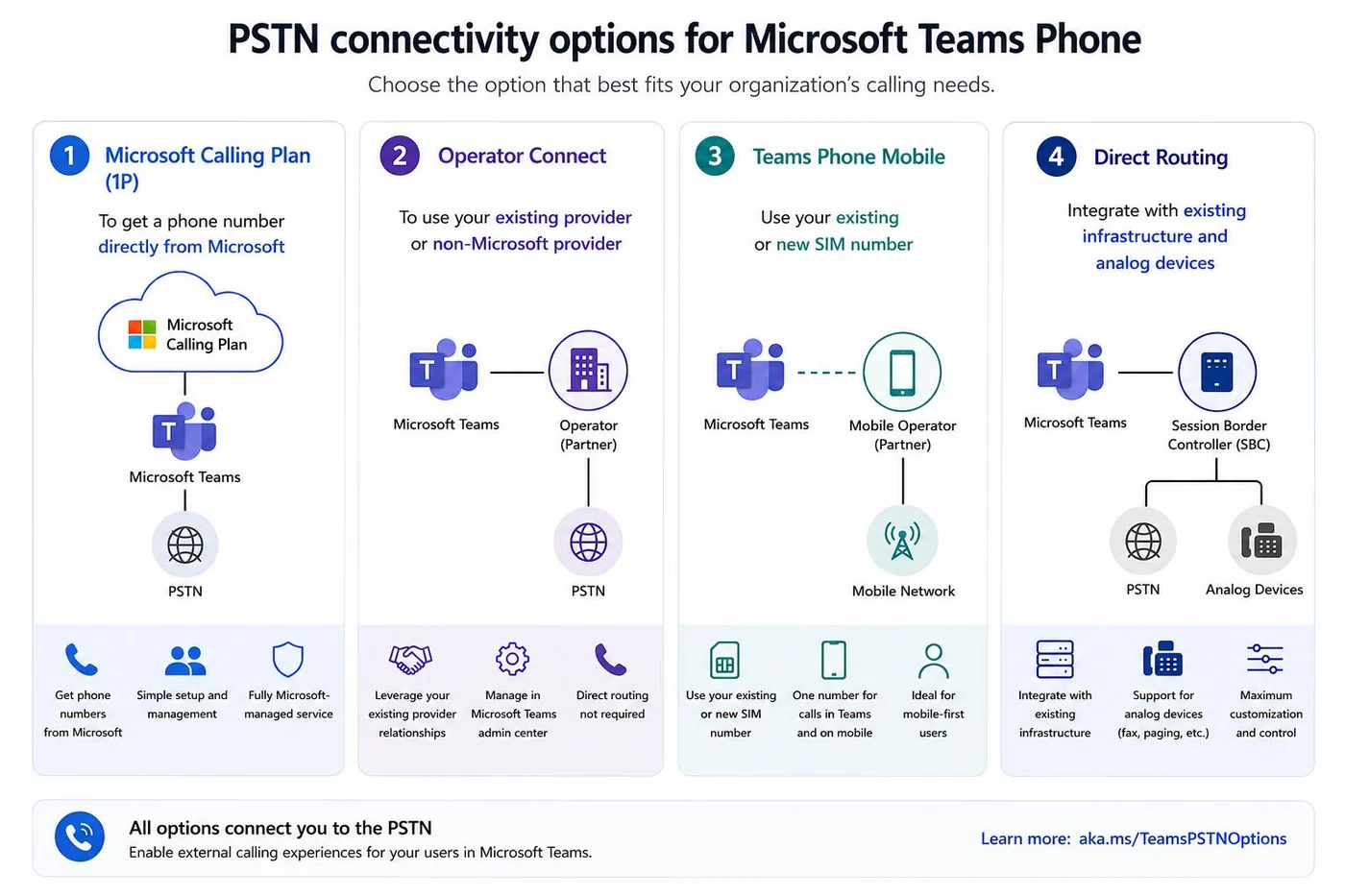
Phone calling needs a separate look from Teams meetings and calls over the internet. Teams Phone provides the phone-system capabilities, but calling telephone numbers also requires a connection to the public switched telephone network, or PSTN. A Teams Phone license alone does not provide that connection. [53]
GCC supports Microsoft Calling Plans and Direct Routing. In GCC High, Microsoft delivers Teams Phone and Audio Conferencing through Direct Routing. That means planning for a provider and a certified Session Border Controller, whether the organization manages it directly or purchases a managed service. Microsoft’s general diagram below illustrates the models, but the four options are not all available in GCC High. [54], [40], [8], [53]
Dial-in conferencing also takes more setup in GCC High. Organizations use their own dial-in numbers and route meeting dial-outs through Direct Routing. Microsoft requires both tenant and user Audio Conferencing licenses. It also recommends setting up the dial-in numbers before assigning the user licenses, since doing this in the wrong order can leave the Teams dial pad missing. [55]
For Teams phone calling in GCC High, organizations also need to work with a third-party telephone provider to connect Teams to the PSTN. Organizations can deploy and manage the certified SBC directly, as shown below, or use a provider that hosts and manages it on their behalf. Either way, the provider’s PSTN service is separate from the organization’s Microsoft licenses. If an organization uses a carrier-hosted service, Microsoft requires both the carrier and customer tenants to be in GCC High, so support for Commercial Teams alone is not enough. [53], [63]
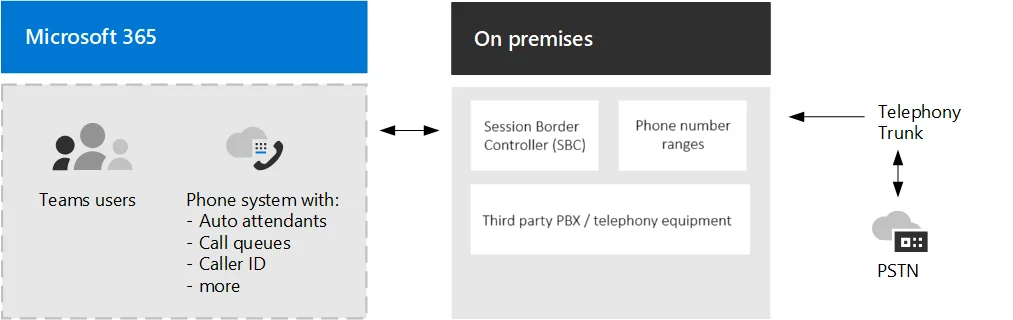
Teams Rooms has its own licensing considerations. A standard M365 user license does not substitute for a Teams Rooms license. Basic may be enough for a small Commercial deployment, but it is not offered for GCC or GCC High. Pro is the available option for those government environments. [56]
| Consideration | Rooms Basic | Rooms Pro |
|---|---|---|
| Cloud availability | Commercial, Education and Nonprofit | Also available in GCC, GCC High and DoW |
| License count | Up to 25 per organization | No equivalent 25-license cap |
| Join meetings across Teams clouds | Not included | Included, with platform and cloud limits |
| Teams Phone Standard | Not included | Included, PSTN connectivity still required |
| Advanced room management | Basic inventory and updates | Enhanced monitoring, configuration and analytics, with cloud limits |
Source: Microsoft Teams Rooms licensing guidance. Service inclusion does not remove government-cloud or device limitations. [56]
Choosing Pro does not guarantee the same experience as Commercial. Microsoft’s device comparison lists cross-cloud join as available on Windows and limited on Android in GCC High. It also lists remote access as unavailable in GCC High. Organizations should check the intended room hardware and management features together before deciding on a deployment. [57]
Teams Applications and Extensibility
For those used to Commercial, Teams applications are another area where the familiar experience starts to change. GCC supports third-party catalog apps, although they are disabled by default. GCC High does not support that catalog. Microsoft applications are supported, but that does not mean every app is available. Shifts, for example, is available in GCC but unavailable in GCC High. [58], [59]
| Application or distribution model | Commercial | GCC | GCC High |
|---|---|---|---|
| Microsoft applications | App-specific availability | App-specific availability | App-specific availability |
| Third-party catalog applications | Available under tenant policy | Available, disabled by default | Unavailable |
| Organizational applications distributed by administrators | Available | Available | Available |
| Direct user sideloading | Available under tenant policy | Available under tenant policy | Unavailable |
| Workflows app in Teams | Available | Available | Unavailable |
Sources: Microsoft’s Teams government-cloud capability matrix and custom application guidance. [58], [60], [61]
GCC High still supports organizational applications, including custom tabs, bots and message extensions. Administrators can upload and distribute those packages through the Teams admin center, while direct user sideloading is unavailable. That gives organizations a route for custom integrations, provided the identity and vendor compatibility checks discussed in the Entra ID section are also met. [58], [60], [61]
Automation needs a separate check. Microsoft scheduled the final retirement of legacy Teams connectors for May 2026, while some government guidance still describes older webhook options. Since the Workflows app is unavailable in GCC High, organizations should verify the supported replacement for each integration rather than assuming the Commercial migration route carries over. [58], [62]
7 SharePoint and OneDrive
Moving from Teams into SharePoint and OneDrive, the main question is how easily organizations can work on files with their partners. That includes opening shared content, managing access and keeping local copies in sync.
External Sharing and Permissions
The guest and cross-cloud setup discussed in the Entra ID section also applies here. Commercial and GCC can use same-cloud B2B collaboration. Working between either of those environments and GCC High requires both organizations to configure cross-cloud access. Once that relationship is in place, administrators still need to grant the guest access to the site, folder or file. [35], [65]
External sharing also needs to be allowed at both the organization and site level. The more restrictive setting wins, and OneDrive can be equally or more restrictive than SharePoint. With B2B integration, Entra invitation and domain restrictions can introduce another limit. So even after organizations establish the partner relationship, a site-level setting can still prevent the intended collaboration. [66]
The type of sharing link matters too. Specific people links require the named recipient to authenticate and do not give someone else access just because the link is forwarded. People in your organization links do not work for guests. Where permitted, Anyone links do not require sign-in and can be forwarded. [67]
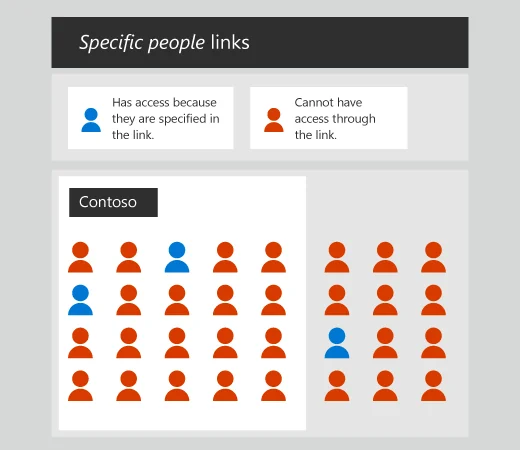
For ongoing projects, Microsoft recommends managing connected site membership through the Microsoft 365 group or Teams. Sharing individual files can create unique permissions that no longer inherit the parent site’s permissions. Basic guest viewing and editing does not require a Microsoft 365 license in the organization’s tenant, although additional services, such as their own OneDrive storage, require an appropriate license. [68], [72], [65]
Synchronization and Protected Content
The more consequential difference is local synchronization. Commercial and GCC partners can use B2B Sync because both use Azure Commercial identities. GCC High partners can use it with other GCC High tenants, but sync between Commercial or GCC and GCC High is unsupported. A partner may therefore be able to open and edit shared files in the browser without being able to sync that content to their computer. [38], [35]
Even within the same cloud, B2B Sync requires a guest linked to an Entra work or school account and content shared at the site or folder level. Individually shared files and Anyone links do not qualify. Guest Conditional Access policies also need to support the sync workflow. [38]
Device policies can further narrow the experience. Limited access for unmanaged devices can allow browser use while preventing download, print, sync and desktop app access. Removing a guest’s permission also does not erase copies already synced to their computer. [69], [38]
If a sensitivity label encrypts a file, permission to access the SharePoint file and permission to decrypt it are separate requirements. A site label also does not automatically label or encrypt its documents. Those protection settings are covered in Appendix C. [70], [71]
8 Exchange Online and Outlook
Exchange Online and Outlook introduce another part of the tenant decision that users will notice immediately. The main differences here are how accounts and calendars work across clients, and which integrations remain available in Government.
Client and Account Experience
For those who keep several work and personal calendars in Outlook, mobile is where one of the more frustrating differences shows up. Microsoft’s default government configuration limits Outlook for iOS and Android to the user’s government account and associated OneDrive account. This applies to GCC as well as GCC High, so it is not just a GCC High limitation. Adding a government account can therefore prevent the familiar experience of keeping multiple accounts and their calendars together in Outlook. [73]
On iOS, Microsoft’s normal way of displaying an iCloud calendar in Outlook is to add the iCloud account. The government restriction on personal accounts limits that route. Shared calendars opened through the existing government account are a separate workflow, so this should not be read as a prohibition on every additional calendar or every calendar app on the phone. [73], [74], [75]
Microsoft documents a tenant-wide setting, OutlookMobileGCCRestrictionsEnabled, for enabling the restricted features. This affects all Outlook mobile users in the organization and enables features Microsoft classifies as outside its FedRAMP-compliant mobile configuration such as allowing multiple Outlook accounts on the Outlook app. Its guidance does not establish which Commercial and GCC High account combinations are supported afterward. [73], [76]
For organizations keeping Google Workspace as their primary mail and calendar service, the coexistence requirements are covered in Section 10.
Calendar availability has its own setup. Microsoft documents GCC High free/busy sharing with Commercial and GCC through bilateral Exchange organization relationships. That is separate from adding another account to Outlook or enabling a Teams meeting connection. Organizations that routinely schedule with partners in another environment should arrange that relationship ahead of time. [79]
For the encrypted-email experience across clouds, see Appendix C.
Outlook Add Ins and Integrations
As covered in Appendix A, government tenants use a more manual add-in deployment process. Microsoft’s government guidance requires a suitable vendor manifest instead of acquisition from the public store. GCC High also needs the government Office.js endpoint and compatible services behind the add-in. Uploading a manifest does not, by itself, make a Commercial integration work. [80]
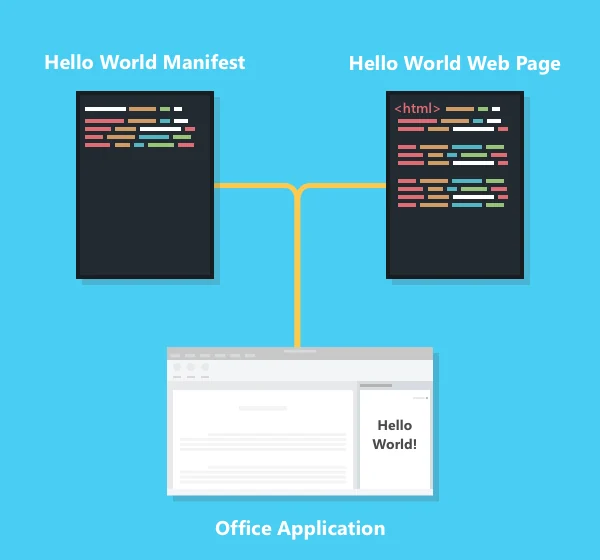
Client support also matters. New Outlook does not support COM add-ins, and web add-ins do not provide every feature across desktop, web and mobile. Microsoft’s newer add-in guidance documents support for government mobile add-ins from version 5.2630.0, but organizations still need to verify the particular vendor’s mobile support and deployment. [81]
Mailbox and calendar integrations need the correct cloud APIs, as discussed in the Entra ID section. Those vendor-specific differences need to be checked separately. Salesforce illustrates why the distinction matters. Its Outlook Integration supports GCC High, although the combination with Salesforce Inbox is unsupported, while Einstein Activity Capture separately excludes national and government clouds. A supported add-in does not establish support for every mailbox or calendar workflow from the same vendor. [82], [83], [84]
9 Third Party Integrations
Beyond Microsoft's own services, organizations also need to account for the applications they connect to them. For many organizations, these connections are part of everyday work. Moving from Commercial to GCC or GCC High can leave an application usable while removing the integration the team relies on. A familiar Outlook add-in or automated business process may no longer have a supported connection. Marketplace and manual deployment differences are covered in Appendix A.
Representative Corporate Workflows
The examples below are a representative sample of published exclusions reviewed on 14 October 2026. They demonstrate why integrations available in Commercial should not be assumed to carry over to another M365 environment. Support may change in the future, so organizations should recheck the required workflow, product edition and destination cloud before committing to a move.
| Commercial workflow | Documented exclusion | Operational impact |
|---|---|---|
| Jira Cloud for Outlook and Microsoft Teams add-ins [135], [136] | GCC and GCC High | The add-ins are unavailable. Atlassian lists no known workaround for those add-ins, so the embedded Jira experience does not carry over. |
| HubSpot team email in the conversations inbox [137] | GCC High | The native shared-inbox connection is unsupported. A shared sales or support address needs a different intake and reply workflow. |
| iCIMS Interview Scheduling V2 [138] | GCC and GCC High | The Spring 2026 FAQ excludes these calendar environments, preventing use of the documented Microsoft-connected interview scheduling workflow. |
| Calendly Preview connector in Power Automate [139] | GCC and GCC High | The packaged connector is unavailable, including its booking and cancellation triggers. This exclusion does not establish the status of Calendly's separate Outlook calendar connection. |
The HubSpot exclusion does not separately establish GCC support. Each row concerns the named integration, rather than every connection offered by that vendor. The iCIMS finding reflects its Spring 2026 release documentation.
There can also be gaps within an otherwise supported application. As covered in the Outlook section, Salesforce excludes GCC High when Salesforce Inbox is used alongside its Outlook integration. Google's native Office 365 provisioning connector also excludes GCC High, as discussed in Section 10. Both illustrate why organizations need to identify the exact function they expect to retain. [83], [95]
Authentication API and Vendor Support
A vendor saying it supports M365 is only the starting point. SSO establishes sign-in, while provisioning creates, updates or disables accounts. Mailbox and file access require their own permissions and API support. A Teams or Outlook add-in, a Power Automate connector and an application's marketplace listing are separate dependencies. Working sign-in does not establish that the business workflow works. [80], [82], [99]
The cloud endpoints discussed earlier still matter. Commercial and GCC use the worldwide Entra and Graph endpoints, while GCC High uses login.microsoftonline.us and graph.microsoft.us. The vendor must support the appropriate application registration and authorization flow, along with every API operation the integration needs. Tokens are not interchangeable between clouds. An available API also does not establish that a vendor has implemented or supports it. [82]
Alternatives and Integration Effort
The replacement depends on what is missing. A vendor-supported government connection may require a different application or configuration. Where the necessary APIs are available, a custom connector or service may restore some functionality. That introduces work the packaged integration previously handled, including authentication, data mapping, retries and monitoring. The organization also takes responsibility for maintaining the connection as either platform changes. [140]
Sometimes the practical alternative is to use the application separately or handle the task manually. That can be workable, but it changes the user experience and creates recurring administration. Organizations should account for that effort alongside licensing and migration costs. Any replacement also needs a review of where it sends and stores data, since a third-party service connected to a government tenant remains outside Microsoft's Government service commitments. [141]
10 Migration and Coexistence Considerations
Full Migration and Government Enclave Options
When considering migrating from commercial to GCC or GCC-H, this leaves organizations with a few different potential deployment models:
- Full M365 migration: The organization moves its M365 workloads to GCC or GCC High.
- Provider-managed government enclave: The organization retains Commercial and obtains a managed government environment.
- Organization-owned government enclave: The organization retains Commercial and establishes a separate government tenant for selected users, data and workloads.
Regardless of which deployment model is selected, each M365 environment still needs to be appropriately configured, hardened and maintained. Moving to GCC or GCC-H does not automatically implement the controls needed to meet the organization’s security and compliance requirements. What changes between these models is who performs that work and how the responsibilities are divided. Organizations should therefore evaluate each option against both the initial implementation effort and the ongoing administrative and operational work, including the responsibilities that remain with the organization when a provider is involved. Supporting device management and security differences are covered in Appendices B through D.
With these shared requirements in mind, the following discussion evaluates each scenario individually, starting with a full migration, where the government tenant becomes the organization’s primary M365 environment, before looking at the two enclave approaches that retain Commercial alongside it. Each presents different tradeoffs between simplifying the overall architecture and preserving the workflows users already rely on.
Deployment Model 1 - Full M365 migration
The first deployment model moves the organization’s primary M365 environment from Commercial to GCC or GCC High. Instead of maintaining a separate government enclave for selected users, the organization adopts the government tenant for its general business operations as well as its government work.
The primary benefit is architectural simplicity. Users can work through one primary M365 identity, mailbox and collaboration environment, reducing the need to switch accounts or determine which tenant should hold a particular conversation or document. Administrators also avoid much of the duplicate account management, licensing administration and coexistence planning associated with operating two tenants. Internal collaboration can remain within the same environment, even when only some employees work with CUI.
The tradeoff is accepting the limitations of the selected government offering across the organization. The service differences, client restrictions and third-party integration gaps discussed throughout this whitepaper now affect the broader workforce, including users whose roles do not require the stricter compliance commitments. A workflow that is essential to sales, recruiting or general business operations may need to be replaced or handled differently, even if that team never works with CUI. GCC and GCC-H should still be evaluated individually, since their limitations are not interchangeable.
A full migration also places sensitive workloads and general business users within the same tenant. This does not automatically bring every user and device into the CMMC assessment scope. That scope depends on how CUI is processed, stored and transmitted, the systems providing security functions, and the separation established around those activities. However, allowing CUI to spread into additional mailboxes, sites or devices can broaden the associated compliance and assessment effort. [10]
The organization therefore needs deliberate internal separation between sensitive and general business resources. For example, sensitive SharePoint content should reside in appropriately restricted sites with controlled membership and sharing, rather than relying on broad access intended for company-wide information. Similar considerations apply to Teams, mailboxes and the devices accessing them. Microsoft recommends organizing sensitive content into dedicated sites or libraries, while its tenant guidance also highlights the shared influence of tenant-wide settings and privileged administrators. Internal permissions can restrict access, but they do not provide the same administrative separation as a separate tenant. [169], [170]
For organizations where government work represents a substantial part of daily operations, this may be a reasonable tradeoff. For those where only a small subset of users needs the government environment, the simplification should be weighed against the impact on everyone else. A full migration can simplify the resulting architecture while still requiring significant migration work and ongoing attention to the boundaries maintained within that tenant.
Deployment Model 2 - Provider-managed government enclave
The second deployment model retains Commercial for general business operations while a managed service provider or managed security service provider operates the government enclave. Selected users access that environment for the workloads and information that require it. This can reduce the need to build the same government cloud administration and security capabilities internally, although the organization still needs to evaluate what the provider actually includes.
The potential benefits include preconfigured hardening, access to specialist personnel, ongoing monitoring and support with compliance documentation and assessment evidence. For a smaller organization, this may offer meaningful cost savings compared with implementing and operating an equivalent environment itself. Those savings should be evaluated against the full cost of onboarding, government licenses, minimum commitments, endpoint or virtual desktop services, changes, and eventual migration. A lower monthly price may also reflect a narrower service scope.
One of the first distinctions to make is whether the provider manages a tenant subscribed to the organization or supplies access to its own environment. Provider management does not automatically mean giving up control of the tenant or ownership of the data. Microsoft recognizes customer ownership of data, but the organization's rights against a provider-owned offering depend on the agreement. The following models should therefore be evaluated separately. [174]
| Delivery model | Administrative control | Typical exit consideration |
|---|---|---|
| Customer-owned dedicated tenant | Customer retains tenant control and delegates daily administration. | The organization can replace the provider and maintain licensing continuity without necessarily moving the tenant. |
| Provider-controlled dedicated tenant | Environment is dedicated, but customer access and transfer rights depend on the agreement. | The organization should confirm whether the existing tenant can be transferred or migration is required. |
| Provider-owned shared environment | Customer receives access to an allocated workspace or service. | The organization exports its data and rebuilds the required environment elsewhere. |
As with many things discussed in this whitepaper, a managed environment should not be treated as a complete compliance solution on its own. The organization still needs to fulfill its assigned responsibilities, including access approvals, personnel processes, workforce training, local physical protections and appropriate handling of controlled information. Some of these activities can be supported by the provider, but they need to be explicitly included. Microsoft's own guidance states that it does not certify or endorse partner offerings for CMMC compliance outcomes. A provider's CMMC certification also does not automatically certify its customers. [3], [171]
Provider qualification requires similar care. Where the provider supplies a cloud service offering that processes, stores or transmits CUI, the particular offering must meet the applicable FedRAMP Moderate or higher authorization or DoW equivalency requirements. For a non-cloud external service provider, the relevant services are assessed within the customer's CMMC scope, and an independent provider certification is not universally required. The DoW FAQ also distinguishes an MSP administering a customer-subscribed tenant from a provider supplying its own cloud service. Organizations should therefore verify the provider's role and exact service boundary rather than request the same certificates from every MSSP. [10], [171], [172]
A claim of FedRAMP equivalency should be supported by the required Body of Evidence, including assessment by a FedRAMP-recognized third-party assessment organization. Microsoft's authorization alone does not establish compliance for every provider-added service. Backup, monitoring, remote administration and support systems should also be evaluated. Services handling security protection data can remain in CMMC scope even when they do not handle CUI. [10], [173]
Before committing, Automata recommends obtaining a service-specific Customer Responsibility Matrix, or CRM, that identifies what is inherited from Microsoft, implemented by the provider, retained by the customer or shared. It should map the applicable requirements and assessment objectives to the actual implementation, exclusions and evidence responsibilities. CMMC requires the provider relationship and services to be reflected in the customer's System Security Plan. Incident notification, reporting, evidence preservation and forensic cooperation also need clear ownership so that the organization can meet its contractual obligations. [10], [11]
Operationally, the government tenant limitations documented throughout this paper still apply, and the provider may impose additional restrictions on applications, integrations, configuration changes or data movement. Organizations should confirm that the offering includes the actual mail, collaboration and application workflows needed, rather than assume a managed enclave provides the full M365 experience. Provider administration also creates another security dependency. Microsoft documents attackers targeting service providers to reach their customers, reinforcing the need for limited administrative access and visibility into provider activity. [176]
The ability to leave the provider deserves the same attention as onboarding. For a customer-owned tenant, Automata recommends retaining customer-controlled emergency administration, supported by tested recovery procedures. The agreement should also address domain and DNS control, licensing continuity, usable backups, data export, migration assistance and access during termination, disputes or insolvency. Compliance evidence and configuration documentation need to remain available alongside business data. In a shared offering, taking over the whole tenant may not be possible, making a tested export and migration path especially important. [174], [175]
This dependency is not merely theoretical. On 6 May 2026, the Washington Business Journal reported that NeoSystems, which served defense contractors, was shutting down amid financial deterioration. A 14 May announcement from NeoSystems and BlueStreet subsequently identified FIT Solutions as the provider assuming service continuity for Information Services Group customers. The episode illustrates why continued access to administration, organizational data and compliance evidence should be addressed before entering a managed enclave agreement. [177], [178]
The need to navigate between Commercial and government environments is common to both provider-managed and organization-owned enclaves. Retaining Commercial alongside a managed government enclave still requires users to choose the appropriate environment for each task and customer. Outsourcing administration does not remove that distinction, and the provider’s design may add separate browser sessions or remote workspaces. Both enclave models therefore need clear guidance on where users should perform their work.
Deployment Model 3 - Organization-owned government enclave
In the third deployment model, the organization retains Commercial for its general business operations and establishes its own GCC or GCC-H tenant for selected users, data and government workloads. This preserves access to Commercial features and integrations while giving the organization control over how its government environment is configured and operated. The tradeoff is responsibility for implementing and maintaining the additional tenant, including its security controls, licensing and user access. The organization also needs to define which activities belong in each environment and how users will work across them, with account and identity design becoming a key part of that decision.
Separate tenants also introduce a day-to-day burden for users, who need to move between Commercial and the government environment depending on the work they are doing and the customer they are working with. Users need to know which identity, mailbox, Teams environment and file location to use, particularly when handling CUI. As discussed in the client sections, the experience varies by application and device, so switching between these environments may involve separate accounts or browser sessions. Clear guidance and training are therefore needed to help users keep their work in the appropriate environment.
The next section examines the options for creating and maintaining separate internal government accounts.
Identity and Account Management for the Government Enclave
An organization-owned government enclave comes with some significant identity challenges that need to be evaluated. Automata initially considered cross-tenant synchronization and other B2B collaboration methods for dynamically adding users to a GCC or GCC-H enclave as needed, based on the capabilities discussed in the Entra ID section. As is a recurring theme in this whitepaper, there are architectural challenges that may make these options unsuitable for an organization that needs separate government accounts for email, collaboration, and other work. [36]
The core challenge with using cross-tenant synchronization and other B2B collaboration methods for this purpose is that users are created as external identities rather than native internal members in the destination tenant. While they will display as “Member” or “Guest” depending on the configuration, digging a little further into their Entra ID properties reveals a few key differences, notably the typical “#EXT#” in their UPN and the B2B collaboration section identifying them as external. Microsoft defines these users as “external members” or “external guests,” depending on their UserType. Cross-tenant synchronization creates new users as external members by default, while standard B2B invitations default to external guests. This can be configured through synchronization attribute mappings or other supported administrative methods. Regardless of their UserType, these users continue authenticating through their home tenant. Changing them from Guest to Member does not make them native internal accounts or remove B2B workload limitations, although those limitations differ between services and user types. [36], [151]
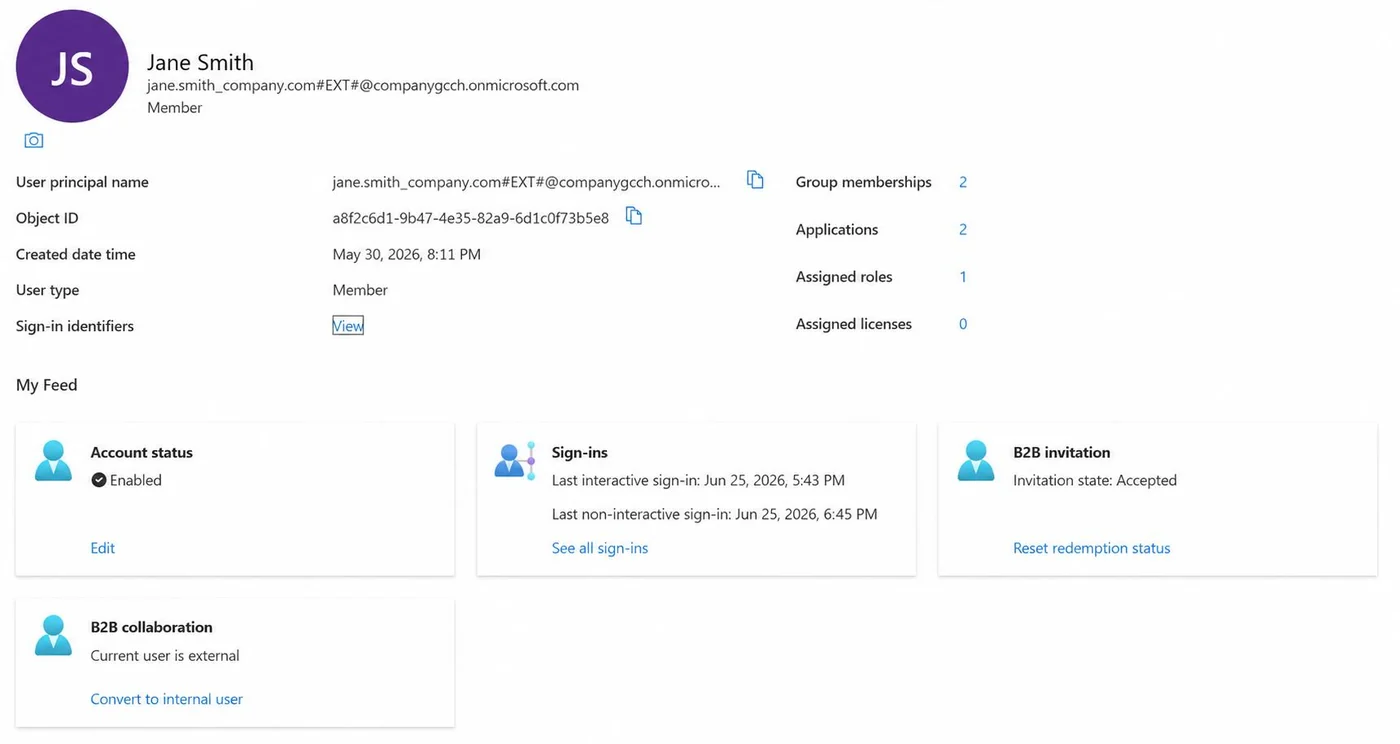
In this illustrative example, Jane Smith’s UPN in each tenant would look like the following. The destination suffix follows the tenant’s Microsoft-provided domain.
- Commercial Entra ID: jane.smith@company.com
- Government Entra ID: jane.smith_company.com#EXT#@companygcch.onmicrosoft.com
While this user now has access to both tenants, their experience differs from that of an internal account because they remain an external B2B identity. The table below summarizes key limitations. Cross-cloud restrictions apply to combinations such as Commercial and GCC-H. Commercial and GCC share Entra Public. [14], [38], [149]
| Service | Support | Key limitation |
|---|---|---|
| Outlook / Exchange Online | Not supported | Cannot access a destination mailbox, including shared or delegated mailboxes. [148] |
| Microsoft Teams | Guest required cross-cloud | Cross-cloud team and channel collaboration requires an external Guest rather than an external Member. [149] |
| SharePoint Online | Supported with permissions | Can access shared sites and documents, subject to sharing policies and permissions. [65] |
| OneDrive | Limited | Browser access to shared content is supported. Desktop synchronization requires both tenants to be in the same Azure cloud. [38] |
| Word, Excel and PowerPoint | Web collaboration supported | Can view and edit shared documents in the browser. Desktop use requires an appropriate license and compatible clients and policies. [65] |
The table above highlights the primary concerns with using B2B identities to manage a government enclave. These accounts do not provide the separate government mailbox an organization may need to send and receive CUI within its selected boundary. That alone may be a showstopper for this approach. For team and channel collaboration between Commercial and GCC-H, users also need to be external guests rather than external members. Guest access may still meet some collaboration needs, but it introduces its own limitations. As the following table shows, the choice affects directory visibility, organization-wide sharing links and default self-service permissions as well as Teams access. Meeting connections and external chat remain separate workflows, as discussed in the Teams section. [37], [148], [149]
| Area | External Guest | External Member |
|---|---|---|
| Cross-cloud teams and channels | Supported through configured guest collaboration. [149] | Unsupported for cross-cloud guest collaboration. [149] |
| Directory visibility | Restricted discovery of users and groups by default. [152] | Broader directory discovery by default. [152] |
| SharePoint and OneDrive organization-wide links | Excluded from “People in your organization” links. Requires appropriate explicit sharing. [150] | Included in the Member-based organization scope, subject to applicable permissions. [150] |
| Directory self-service | More restricted by default. Roles and tenant settings can grant additional abilities. [152] | More default abilities, including creating groups and registering applications, where tenant settings allow. [152] |
| Conditional Access | Can be targeted specifically as a B2B collaboration Guest. [150] | Can be targeted specifically as a B2B collaboration Member. [150] |
Ultimately, while there is a place for cross-tenant synchronization, it may not be the best fit for the enclave scenarios discussed in this paper. If the government tenant is intended to provide the boundary for CUI email, continuing to send that information through a Commercial mailbox does not place it within that government boundary. The government tenant’s authorization does not extend to those Commercial mail flows. The organization still needs to ensure that its actual email handling meets its defined CUI boundary and applicable contractual requirements. [1], [11]
Automata therefore recommends evaluating the following approaches for creating separate internal government accounts. Each comes with different administrative burdens and identity dependencies:
- A separate government tenant with manual user provisioning and independently managed internal accounts.
- A shared directory or identity management platform, such as Active Directory or a supported third-party provider, that provisions internal accounts in both Entra ID tenants.
- Custom provisioning through supported APIs or SCIM that uses Commercial Entra ID as the source for creating and maintaining separate internal accounts in the GCC or GCC-H tenant.
All of these paths share one common factor: the government tenant needs its own domain namespace. Microsoft provides a default domain with the tenant, but from a reputational perspective, Automata strongly recommends using a recognizable organizational domain for external correspondence. The default Microsoft-provided domain can appear less professional and may cause recipients to question the legitimacy of a message.
If the organization’s primary domain will remain assigned to its Commercial tenant, the government tenant will need a different custom namespace. Microsoft supports using a subdomain in a separate tenant, so purchasing another registered domain is not required. For an organization using company.com, the options would look something like the following. [142]
| Consideration | Subdomain: gov.company.com | Separate domain: gov-company.com |
|---|---|---|
| Brand recognition | Clearly associated with the existing company | May require additional explanation to partners |
| Domain management | Uses the existing registration | Requires separate registration, renewal and recovery management |
| DNS administration | Can be delegated separately, but remains dependent on the parent domain | Can be administered independently of the corporate domain |
| Email authentication | Requires its own SPF and DKIM configuration. DMARC can inherit the parent policy or be configured separately | Requires its own SPF, DKIM and DMARC configuration |
For many organizations, a subdomain provides a practical balance between maintaining a recognizable identity and separating government accounts. However, separate DNS administration does not remove the parent-domain dependency. Administrators controlling company.com can still change the delegation for gov.company.com. A separately registered domain offers greater independence, provided its registrar accounts and administrative access are also appropriately separated. [143]
Email authentication also needs consideration. A subdomain does not inherit its parent’s SPF or DKIM configuration, and the government namespace must authorize the appropriate sending infrastructure. DMARC behaves differently: its default relaxed alignment can recognize related parent and subdomain identifiers as aligned. Organizations seeking stronger separation should evaluate explicit DMARC policies and strict alignment against their required mail flows. [144], [145], [146]
One additional M365 nuance is that the custom email domain does not determine the SharePoint or OneDrive hostname. Those addresses remain tied to the tenant’s Microsoft namespace, and Microsoft does not support SharePoint domain renaming in GCC, GCC High or DoW. The initial government tenant name should therefore be selected carefully, regardless of which email domain approach is chosen. [147]
The following sections evaluate each of the three identity approaches individually.
A separate government tenant with manual user provisioning and independently managed internal accounts
The first approach warrants only a brief discussion here, as it is often the most straightforward starting point, particularly when only a small number of users need access to the government environment. Administrators create internal accounts directly in the GCC or GCC-H tenant, assign the required licenses and permissions, and configure authentication independently of Commercial. Users can then access their government mailbox and other licensed services through those accounts. [161], [165]
As with the other approaches, the government tenant requires its own licensing, security configuration and service permissions. The distinction here is that account creation and ongoing account management are handled independently, without synchronization from another directory. This does not mean every configuration must be repeated manually for every user. Groups and tenant policies can still simplify access management within the government environment.
The tradeoff is the recurring administrative effort. Onboarding, account changes, account recovery and offboarding must account for both tenants. Disabling a user’s Commercial account does not automatically disable their independently managed government account. The organization therefore needs a reliable process to remove access from both environments when someone leaves, while preserving any required mailbox and file data. This burden grows with the number of users and the frequency of account changes. [167]
For users, this also means maintaining separate sign-ins and distinguishing between their Commercial and government workspaces. Clear guidance on which account to use for email, meetings and shared documents is important, especially when handling controlled information. For a small and relatively stable enclave, this may be a reasonable operational tradeoff compared with implementing and maintaining a shared identity integration.
While this approach typically creates the greatest manual account-management burden, it also offers the strongest identity and authentication separation among the three approaches. The government tenant does not depend on the Commercial directory or a shared identity provider for provisioning or sign-in. For organizations with strict compliance assurance needs, reducing these shared dependencies can make the government access boundary easier to define, control and demonstrate, provided the surrounding administration, devices and data flows also support that separation.
A shared directory or identity management platform that provisions internal accounts in both Entra ID tenants
The second approach introduces a shared platform to manage users across both environments. Instead of manually maintaining each account, the organization manages a common source identity that provisions separate internal accounts into Commercial and the government tenant. This approach creates internal workforce accounts for the services users need within each environment.
For organizations already using Active Directory, this can be accomplished through separate Microsoft Entra Connect Sync deployments, one for each destination tenant. Microsoft explicitly supports synchronizing the same AD source into multiple Entra tenants, including Commercial and government environments. Each deployment can have its own scope, allowing Commercial to include the broader workforce while the government tenant includes only users who need access to the enclave. [153]
The same AD account can also receive different usernames in each tenant through tenant-specific synchronization rules. For example, jane.smith@company.com could remain the Commercial username while the government account uses jane.smith@gov.company.com. This does not require creating a second AD source account for that person. With password hash synchronization, both accounts can use the same AD password while each cloud validates authentication independently. Shared credentials should not, however, be confused with automatic SSO between the two cloud environments. [153], [154], [155]
For organizations looking for a cloud solution without introducing AD infrastructure, Okta provides another documented example. Okta Identity Engine supports Microsoft 365 provisioning and SSO for Commercial, GCC and GCC High. GCC High uses a dedicated Microsoft Office 365 Government integration that connects to the appropriate government endpoints. [156], [168]
In this model, separate Microsoft 365 application integrations would maintain the destination accounts, username mappings and assignments. Okta’s Profile Sync supports user creation, profile updates, deactivation, licenses and roles. Users can be maintained directly in Okta or imported from supported sources, allowing the government account to be provisioned without relying on a B2B invitation. Federation can then allow both Microsoft environments to authenticate through Okta, reducing the need for users to manage separate credentials. The selected Okta offering and its support for the intended combination of destination tenants should be confirmed during implementation. [157], [158], [159]
Neither approach removes the need to configure the government workloads themselves. Each destination still requires appropriate licenses, permissions and mailbox configuration. Username mapping alone does not establish the correct email addresses or validate an Exchange coexistence design. [166]
The primary tradeoff is that reducing duplicate account administration introduces a shared identity dependency. With AD, that dependency includes the directory, synchronization infrastructure and administrators. With federated Okta authentication, the shared provider also becomes part of the sign-in path. Organizations should therefore evaluate how that shared authority affects the separation they intend to establish around the government enclave. Microsoft’s tenant isolation guidance specifically identifies shared directory infrastructure as a consideration when assessing separation between tenants. [160]
Custom provisioning through supported APIs or SCIM that uses Commercial Entra ID as the source for creating and maintaining separate internal accounts in the GCC or GCC High tenant
The third approach uses Commercial Entra ID as the source for provisioning separate internal accounts into the government tenant. For organizations that already manage their workforce in Commercial, this provides another way to automate account administration without introducing Active Directory or a separate identity provider. The integration reads approved users, derives their government usernames and creates or updates their accounts through supported interfaces.
Microsoft Graph supports standard user creation and management in both GCC and GCC High. These operations create workforce accounts separately from the invitation process used for B2B collaboration. For example, the integration could use jane.smith@company.com as the source record while maintaining an internal government account at jane.smith@gov.company.com. The destination namespace must be verified in the government tenant. [161]
Microsoft also now documents inbound SCIM APIs as generally available in US Government. This provides a standardized interface for managing users and groups, although the direct SCIM feature requires Entra ID P1 or a license that includes it, linked Azure billing and paid API usage. Depending on the required mappings and supported authentication, configured provisioning services may reduce the amount of custom integration work. However, the availability of these interfaces should not be treated as a turnkey Commercial-to-GCC High synchronization solution. [162], [163]
The organization must define which users and attributes Commercial is allowed to manage. Basic information such as names, departments and job titles can come from the Commercial account, while government access, licenses and security policies remain governed by the enclave’s requirements. Each source account also needs a stable association with its destination account so that a username change updates the existing user rather than creating a duplicate.
Authentication needs separate consideration. Microsoft Graph cannot retrieve the user’s existing Commercial password and copy it into the government account. The government account therefore requires its own authentication configuration, whether independently managed credentials or a separately validated federation arrangement. Provisioning alone does not establish SSO between the two environments. Government licenses, mailbox addresses and other workload settings also require destination-specific configuration. [164], [165], [166]
The primary administrative burden shifts from manually maintaining users to maintaining the integration itself. This includes handling onboarding, changes, removal of enclave access, account disabling, session revocation and eventual deletion. A Commercial account being disabled does not automatically disable its separate government account unless that action is explicitly propagated. Failed operations therefore need monitoring, retries and reconciliation, alongside a government-side process for urgent access removal. [167]
This approach offers flexibility while preserving separate internal government identities. However, Commercial remains an upstream management dependency, and the integration receives permissions to influence government accounts. Its credentials, administrative access and allowed operations should therefore be evaluated as part of the enclave’s security design.
Google Workspace and Microsoft 365 Coexistence
The discussion now turns to how M365 integrates with Google Workspace. This might seem like an unnecessary tangent, but in Automata’s experience there are often cases where organizations have to comingle these two ecosystems. This is especially true in the CMMC world. Google Workspace maintains its own FedRAMP High authorization and can support CUI workloads when appropriately licensed and configured, including the use of authorized services and Assured Controls Plus. [93] Even so, M365 is widely used across the DoW. [94] This puts many organizations hosted on Google Workspace that work heavily with the DoW in a tough spot, often operating two productivity and collaboration suites that need to be separately managed or integrated through SSO, supported account provisioning, calendar workflows and add-ons.
Identity and Account Management
When operating both ecosystems, one of the first decisions is which directory manages user accounts and which service handles sign-in. As discussed in the Entra ID section, provisioning and single sign-on are separate integrations. Having users authenticate successfully does not mean their accounts will be created, updated or disabled automatically.
If Google Workspace remains the primary directory, Google's native Office 365 user provisioning connector presents a significant limitation in GCC High. Google explicitly excludes GCC High because it uses different authorization endpoints. [95] Automata confirmed this limitation when testing in a customer tenant. Microsoft accounts therefore need another provisioning and lifecycle management process. This restriction should not be extended to GCC, which uses Entra Public and is not named in Google's exclusion. [14], [95]
SSO can operate in either direction through SAML. Google can authenticate users accessing M365, or Entra ID can authenticate users accessing Google Workspace. [96], [97] In GCC High, the configuration needs the government tenant's authentication settings and endpoints. [42], [43] If Google handles Microsoft sign-in, matching Entra accounts must already exist and their identifiers must align with the Google SAML configuration. SSO does not create those accounts, so Google can remain the sign-in service even when its native provisioning connector is unavailable. [96]
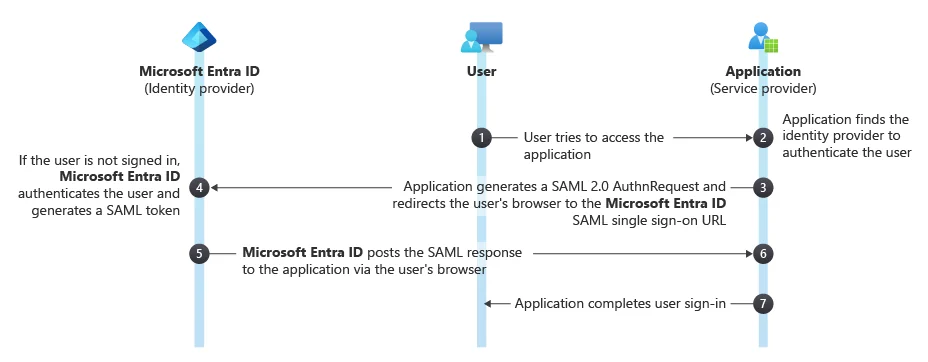
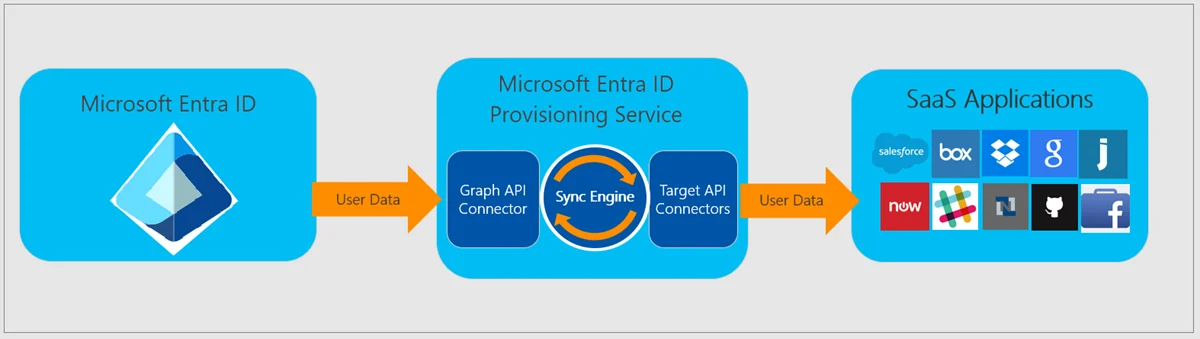
Going in the other direction, Microsoft documents an Entra-to-Google connector for provisioning users, attributes, groups and group memberships. [98] However, Microsoft also warns that only a limited set of gallery provisioning connectors is available in Azure Government. Organizations should therefore validate the Google connector in GCC High before treating the reverse integration as supported. General availability of provisioning in Government does not establish support for every connector. [99]
Mail and Calendar Coexistence
Keeping Google Workspace as the organization’s primary mail and calendar service adds another complication, especially when the same domain and user addresses exist in GCC High. Teams' standard calendar experience depends on Exchange, so using the same address in both systems does not keep their calendars synchronized. In Automata’s own GCC High deployment, the Google Workspace–Teams calendar sync option was not available. Organizations need a separate coexistence plan for meeting invitations and updates to appear in the right calendar. Internal Relay alone does not resolve this, because Exchange still delivers to known local recipients rather than sending every invitation to Gmail. [77], [78]
Microsoft now also states that its managed Google Workspace–Teams calendar sync is no longer supported beginning October 2026, including calendars already configured for syncing. [86] The recommended Teams meeting add-on lets users schedule and join Teams meetings from Google Calendar, but meetings created there do not synchronize with Microsoft calendars. Automata also found that add-on unavailable in its own GCC High deployment. Microsoft's setup guidance does not provide a GCC High configuration path. [87], [88]
Microsoft still publishes Google Calendar and Office 365 Outlook connectors for Power Automate, with GCC High included in the documented availability. These provide event actions and change triggers for a custom calendar workflow. Organizations would need to maintain event matching and handle updates, cancellations and duplicate prevention. This is an integration to build and support, rather than a managed replacement for the retired sync service. [89], [90]
Google's Calendar Interop covers availability lookups and resource booking. Its setup expects Exchange users to have no Google Workspace account or to have Google Calendar turned off, so it does not merge two active calendars for the same user. [91], [92]
11 Conclusion and Recommendations
The compliance requirements of an upcoming contract or opportunity may quickly point an organization toward M365 GCC or GCC High. However, the technical impact of that choice still needs to be carefully evaluated. The organization needs to weigh the cost of delivering and sustaining the required environment against the expected value of the opportunity, while ensuring that the selected approach meets its obligations.
What initially seems like a simple migration decision can have significant cascading effects across an organization. If those effects are not properly accounted for and designed around, they can disrupt operations, reduce productivity, and affect revenue.
Key Findings
Across the services discussed, the recurring issue is that familiar M365 functionality does not always carry over in the same way. External collaboration, client behavior and third-party integrations can introduce configuration work and limitations or replacement processes that users and administrators did not previously need.
Identity integration also needs to be evaluated against the actual task. A guest relationship or synchronized external identity can simplify access but does not provide the same experience as a separate internal government account. The required email and collaboration workflows must drive that design.
The deployment model determines who experiences these limitations and who manages the additional work. A full migration means all users must work within the capabilities and limitations of GCC or GCC High. Both enclave models preserve Commercial alongside a government environment, bringing additional account management and user navigation. A managed provider changes the division of responsibilities, while the organization retains its own compliance obligations.
Selecting and Validating a Deployment Model
Automata recommends establishing which environments meet the organization’s applicable requirements, then evaluating the tenant and deployment model together. The decision should account for actual collaboration partners, essential applications and anticipated organizational needs.
Before committing, organizations should test the workflows on which daily work depends in the intended environment, using representative users, devices and partner organizations. The evaluation should confirm that email, meetings, shared files and required integrations work as intended, and identify the administrative and support effort needed to sustain them.
The final cost comparison should include implementation, licensing, ongoing administration and the productivity impact on users. For provider-managed environments, it should also establish the responsibilities retained by the organization and its ability to maintain access to its tenant and data. These findings should inform the decision before the organization commits to a migration or the opportunity that depends on it.
Appendix A Microsoft 365 Admin Center
Even some fairly routine tasks in the Microsoft 365 admin center can look different depending on the organization’s environment.
One of the first differences is how administrators find and deploy third-party apps. In Commercial, the Integrated apps portal lets administrators find and deploy apps from Microsoft Marketplace, previously known as AppSource. That portal is not available in GCC or GCC High. [25]
For Office Add-ins in GCC High, Microsoft documents a more manual process through Settings > Add-ins, where administrators upload the add-in’s XML manifest or provide a URL to it. For those used to selecting an add-in from the store and assigning it to users, that is another step to account for. Organizations also need to check that the vendor supports GCC High. Uploading a manifest does not make an incompatible integration work. [26]
Another difference shows up with pay-as-you-go services. Microsoft 365 Backup is available in Commercial and GCC, but Microsoft’s current deployment documentation does not support it in GCC High. [27], [28] Microsoft’s native eSignature service for SharePoint is also unavailable in GCC High, and its pay-as-you-go offering is not currently available in GCC either. [29], [30] Organizations planning to use either service should check its availability in the destination environment before assuming it will carry over. Having an Azure Government subscription does not, by itself, make a missing M365 service available.
Finally, GCC High does not have the native Microsoft Edge management service in the M365 admin center. Microsoft also lists this service as unavailable for GCC plans. [31] Organizations used to managing browser settings and extensions from that pane in Commercial will need to plan for another management route, such as Group Policy on Windows or supported Intune policies. [32] That is another fairly routine task that will need a different approach when moving between environments.
Appendix B Microsoft Intune
Intune brings another set of differences to consider for the devices users work on. GCC uses the same Intune service instance as Commercial, while GCC High uses the separate government instance. [102]
Enrollment and Provisioning
Windows, macOS, iOS, iPadOS and Android remain supported platforms in GCC High. Administrators can still enroll and manage these devices, with the workflow depending on device ownership and platform requirements. Apple enrollment should also be evaluated separately from Apple account federation. [102], [113]
Windows provisioning has the more consequential difference. Classic Windows Autopilot is unavailable in GCC High, but user-driven Windows Autopilot device preparation is supported. It uses the existing Windows 11 installation and Entra join, with applications and scripts selected for installation during setup. Pre-provisioning, self-deploying mode and additional setup customization remain unavailable and planned. [103], [102]
Application Deployment and Windows Management
In Automata’s GCC High tenant, testing confirmed that only the legacy Microsoft Store application type is exposed. The modern Store integration available in Commercial and GCC is absent from that tenant. The legacy method supports user-initiated installation, while the modern integration provides native catalog search and required deployment. Microsoft’s government guidance does not clearly identify this modern integration restriction, so this finding reflects Automata’s tenant testing. [104], [105], [102]
Company Portal itself illustrates the additional work. In Commercial and GCC, administrators can select it from the Store catalog and assign it to install automatically. Automata’s GCC High deployment instead uses a manually downloaded line-of-business package. This deployment requires uploading the application bundle and its dependencies, checking architecture coverage and validating installation. Required device assignments still allow automatic installation across the fleet. [106], [107]
Updates need a separate look. A LOB-installed Store application can still receive automatic Store updates where connectivity and policy allow them. Those updates do not refresh the package uploaded into Intune, however. Organizations remain responsible for maintaining that deployment source and, where Store servicing is restricted, an alternative update process. [108], [109]
Win32 and LOB deployment remain available in GCC High. The separately licensed Enterprise App Management catalog can reduce packaging work for supported Win32 applications, but it does not replace every Store application. Organizations still need to check catalog coverage and vendor licensing. [110], [111]
Remediations are also unavailable in GCC High. Ordinary platform scripts remain an option, but successful scripts normally run again only after the script or policy changes. Recreating scheduled detection and correction therefore introduces additional administration. Integrated BIOS profiles and DFCI are also unavailable, as are Autopatch and dedicated feature, quality, expedited and driver update policies. Scripts and vendor utilities may provide alternatives, with their own reporting, password handling and support requirements. [102], [112]
Apple Ecosystem and Mobile Management
The Apple limitation is more specific than Apple account management being unavailable. Apple’s native Managed Apple Account federation with Entra explicitly excludes national clouds, including Entra Government. GCC High organizations therefore need a separate approach to Apple account credentials and lifecycle management. [114]
This does not prevent Apple Automated Device Enrollment or device-licensed Apps and Books deployment. Device-licensed applications do not require users to sign in to an Apple Account. Account-driven User Enrollment has different dependencies: it requires Managed Apple Accounts and user-licensed applications, although federation is recommended rather than mandatory. The additional burden therefore depends on which Apple workflow the organization needs. [113], [115], [116]
Appendix C Microsoft Purview
Purview covers how information is protected and how records and activity are collected. Core labeling, DLP, retention, Audit and eDiscovery capabilities are available in GCC and GCC High, subject to the appropriate licensing. The differences below concern how those capabilities fit into organizations’ daily workflows. [117], [118]
Information Protection and External Collaboration
One visible difference is encrypted email. Messages crossing the GCC High boundary use a wrapper that directs the recipient to the encrypted message portal, including encrypted mail sent from Commercial into GCC High. Within GCC High, supported Outlook clients retain the familiar inline reading experience. This means the same protection feature can introduce another sign-in and browser workflow when communicating with partners. [119]
Protected files need a separate look, as noted in the SharePoint section. Microsoft’s newer guidance documents cross-cloud access to encrypted Office files with supported clients and configuration on both sides. Both administrators must enable the partner cloud and add the partner organization. That documented workflow does not cover SharePoint or OneDrive sharing links, so organizations should validate the specific sender, recipient, client and sharing method. A working guest relationship alone does not establish access to encrypted content. [120]
Audit and Third Party Data Coverage
Third-party archiving has a clearer availability gap. Microsoft lists the Slack, Zoom, Webex and ServiceNow DataParser connectors as supported in GCC but unsupported in GCC High. These are specific partner archiving integrations, rather than a prohibition on every possible import method. If organizations expect Purview to retain and search records from those platforms, they need to check the supported collection route and the partner service behind it. [121]
Audit integrations also depend on the API used. The newer Graph Audit Search query endpoint is unsupported in GCC High, while the Office 365 Management Activity API remains available through its government endpoint. That API delivers subscribed activity feeds rather than the same historical search workflow. The organization’s SIEM or custom integration therefore needs to support the correct retrieval method, even though audit export itself remains available. [122], [123]
Existing eDiscovery matters also need planning when moving between clouds. Microsoft states that eDiscovery cases, searches, holds and review sets cannot migrate across cloud security boundaries. They remain in the origin cloud and cannot be accessed from the destination. Organizations need to complete or export required matters in the origin environment before the move and plan for rebuilding investigation structures afterward. [124]
Appendix D Microsoft Defender
The differences in Defender affect the security team’s experience. Core Endpoint, Office 365 and XDR protection are available in government environments, but that does not establish parity for every investigation, risk-prioritization or integration workflow. [125]
Protection and Feature Availability
One of the larger differences is Microsoft Security Exposure Management, which is unavailable in GCC and GCC High. Its unified exposure graph, attack surface map and attack-path analysis should be evaluated separately from endpoint protection and vulnerability scanning. For government SaaS posture recommendations, Microsoft points customers to Secure Score instead. Organizations relying on the Commercial exposure-management experience will need another approach to that broader risk-prioritization workflow. [126], [127]
Some narrower gaps also matter. Defender for Cloud Apps excludes specific App Governance detections, including certain suspicious OAuth application activity. Attack simulation training is available in GCC High, but advanced features such as payload automation and recommended payloads are excluded. Organizations should check the particular detection or training workflow rather than treating the whole product as unavailable. [128], [129]
Native user reporting of suspicious Teams messages, calls and meetings is also unsupported in GCC and GCC High. That removes a familiar route for escalating suspicious collaboration activity into Defender. Organizations need another reporting process for users and a way for the security team to capture the relevant context. [130]
Security Operations and Integrations
The cloud-specific API requirements discussed in the Entra section apply here too, with an additional GCC nuance. GCC uses the familiar Commercial portal and sign-in endpoint, but its Defender XDR API is api-gcc.security.microsoft.us. GCC High uses api-gov.security.microsoft.us and government authentication. Advanced-hunting APIs are supported in Government, so the question is whether the organization’s integration supports the right endpoint and operation. [125], [132]
Multitenant management is available, but its documented cross-cloud combinations are narrower. Microsoft describes GCC managing Commercial tenants and GCC High and DoW managing each other’s tenants. This does not establish a single native view spanning Commercial and GCC High. Organizations operating a Commercial environment alongside a government enclave, or managing customers across those boundaries, need to validate that combined security workflow. [131]
Security Copilot also needs a separate availability check. Microsoft’s onboarding guidance excludes government clouds, while its privacy guidance acknowledges GCC customers adopting the Commercial SKU, with associated GCC customer data stored in Azure Public Cloud’s US geography. That exception does not establish a sovereign GCC High offering or parity for embedded investigation and agent workflows. [133], [134]
References
Numbered references support the main discussion and Appendices A through D. Citation numbers link to the entries below. Source titles link to the original publications.
- [1] Wakeman, Richard. Understanding Compliance Between Commercial, Government, DoD & Secret Offerings: May 2026 Update (opens in a new tab). Microsoft Public Sector Blog. May 2026 update. Available on The Microsoft Cloud Blog.
- [2] FedRAMP. Using a FedRAMP Certified Cloud Service (opens in a new tab). FedRAMP Consolidated Rules for 2026.
- [3] Microsoft. Microsoft and the Cybersecurity Maturity Model Certification (opens in a new tab). Microsoft Learn. See the customer responsibility statement under Microsoft services.
- [4] Microsoft. Office 365 US Government (opens in a new tab). Microsoft Learn. See Customer eligibility and the ITAR contract language commitment.
- [5] FedRAMP. Microsoft 365 Government Community Cloud & Supporting Services (opens in a new tab). FedRAMP Marketplace. Package MSO365MT. Class C Moderate, FedRAMP Certified.
- [6] FedRAMP. Microsoft 365 Government Community Cloud & Supporting Services (opens in a new tab). FedRAMP Marketplace. Package MSO365MTA. Class D High, FedRAMP In Process as of 20 July 2026.
- [7] FedRAMP. Microsoft 365 Government Community Cloud-High (opens in a new tab). FedRAMP Marketplace. Package FR1824057433. Class D High, certified since 26 December 2024.
- [8] Microsoft. Office 365 GCC High and DoD (opens in a new tab). Microsoft Learn. Updated 3 August 2026. See Compliance and Customer support.
- [9] Microsoft. Azure, Dynamics 365, Microsoft 365, and Power Platform services compliance scope (opens in a new tab). Microsoft Learn. Azure public services audit scope updated February 2026.
- [10] US Department of Defense. 32 CFR 170.19 CMMC scoping (opens in a new tab). Code of Federal Regulations, 1 July 2025 edition, pp. 826–831. See paragraph c and Tables 3 and 4. GovInfo.
- [11] US Department of Defense. DFARS 252.204-7012 Safeguarding Covered Defense Information and Cyber Incident Reporting (opens in a new tab). Clause dated May 2024. See paragraph b.2.ii.D and paragraphs c through g. Acquisition.gov.
- [12] Microsoft. Cloud feature availability for US Government customers (opens in a new tab). Microsoft Learn. Updated 24 July 2026. See Microsoft 365 integration and the Microsoft 365 cloud integration diagram.
- [13] Microsoft. Microsoft 365 for enterprise (opens in a new tab). Microsoft Licensing Resources. See Microsoft 365 Enterprise FAQ and the separately purchasable suite components.
- [14] Microsoft. Planning identity for Azure Government applications (opens in a new tab). Microsoft Learn. Updated 12 October 2023. See Identity scenarios for subscription administration in Azure Government and Frequently asked questions.
- [15] Microsoft. Microsoft Entra B2B in government and national clouds (opens in a new tab). Microsoft Learn. Updated 7 July 2025. See B2B collaboration across Microsoft clouds and the linked cross-cloud synchronization guidance.
- [16] Microsoft. Compare Azure Government and global Azure (opens in a new tab). Microsoft Learn. Updated 21 August 2025. See Guidance for developers and Service availability.
- [17] Microsoft. Microsoft 365 Government - how to buy (opens in a new tab). Microsoft Learn. Updated 13 August 2024. See the sales-channel table and purchasing steps.
- [18] Microsoft. Offers for the new commerce public sector (opens in a new tab). Microsoft Learn. Updated 20 September 2024. See Government Community Cloud and legacy-offer migration to new commerce.
- [19] Microsoft. Pricing and offers for Office 365, Dynamics CRM, Enterprise Mobility Suite, Azure, and more (opens in a new tab). Microsoft Learn. Updated 16 June 2026. See New commerce terms and billing frequencies and Monthly and annual terms.
- [20] Microsoft. Understand your Microsoft business billing account (opens in a new tab). Microsoft Learn. Updated 26 February 2026. See the supported billing-account types and their definitions.
- [21] Microsoft. Manage your Microsoft business billing profiles (opens in a new tab). Microsoft Learn. Updated 25 June 2026. Applies to Microsoft Customer Agreement billing accounts.
- [22] Microsoft. Create Azure subscriptions programmatically (opens in a new tab). Microsoft Learn. Updated 7 June 2026. Lists the supported Azure agreement types and links to their API and permission requirements.
- [23] Flanakin, Michael. Azure Cost Management + Billing updates – June 2020 (opens in a new tab). Microsoft Azure Blog. Published 30 June 2020. See Automate subscription creation in Azure Government.
- [24] Microsoft. Billing accounts and scopes in the Azure portal (opens in a new tab). Microsoft Learn. Updated 25 June 2026. See the Microsoft Online Services Program and Microsoft Customer Agreement hierarchy diagrams under Scopes for billing accounts.
- [25] Microsoft. Get started with the integrated apps portal (opens in a new tab). Microsoft Learn. Updated 23 January 2026. See Who can access the integrated apps portal and the government-cloud availability FAQ.
- [26] Microsoft. Deploy Office Add-ins in Government Community Cloud High environments (opens in a new tab). Microsoft Learn source repository. Document dated 12 August 2024. Article credited to Eric Splichal. See the GCC High marketplace restriction, manifest deployment steps and compatibility guidance.
- [27] Microsoft. What’s new in Microsoft 365 Backup (opens in a new tab). Microsoft Learn. Updated 14 October 2026. See Use Microsoft 365 Backup in GCC, announced 23 February 2026.
- [28] Microsoft. backupRestoreRoot: enable (opens in a new tab). Microsoft Learn. Updated 21 March 2026. See the national-cloud deployment table for the Microsoft 365 Backup Storage service-enablement API. US Government L4 and L5 are not supported.
- [29] Microsoft. Overview of eSignature (opens in a new tab). Microsoft Learn. Updated 8 August 2026. See Regional availability and Licensing for Microsoft’s native eSignature service.
- [30] Microsoft. Licensing for document processing for Microsoft 365 (opens in a new tab). Microsoft Learn. Updated 23 April 2026. See the GCC pay-as-you-go availability note and the list of document-processing services.
- [31] Microsoft. Get started with configuration policies (opens in a new tab). Microsoft Learn. Updated 17 November 2025. See Prerequisites for the Microsoft Edge management service and its GCC availability restriction.
- [32] Microsoft. Configure Microsoft Edge policy settings on Windows devices (opens in a new tab). Microsoft Learn. Updated 9 July 2026. See Introduction to policy settings on Windows for Group Policy and Intune management options.
- [33] Microsoft. What is Microsoft Entra B2B collaboration? (opens in a new tab). Microsoft Learn. See the overview and B2B collaboration diagram.
- [34] Microsoft. B2B direct connect overview (opens in a new tab). Microsoft Learn. See Teams shared channels, mutual access settings and the direct connect diagram.
- [35] Microsoft. Enable B2B collaboration across Microsoft clouds (opens in a new tab). Microsoft Learn. See cloud enablement, organization-specific settings and supported collaboration scenarios.
- [36] Microsoft. Cross-tenant synchronization overview (opens in a new tab). Microsoft Learn. Source of Figure 6. See user lifecycle automation, cross-cloud support and limitations.
- [37] Microsoft. Meet with people in other Microsoft 365 cloud environments (opens in a new tab). Microsoft Learn. See authenticated cross-cloud meeting connections, guest access and anonymous participation.
- [38] Microsoft. B2B Sync for SharePoint and OneDrive (opens in a new tab). Microsoft Learn. See guest access and the same-Azure-cloud requirement for client synchronization.
- [39] Microsoft. Manage anonymous participant access to Teams meetings and events (opens in a new tab). Microsoft Learn. See organization and meeting policies controlling anonymous participation.
- [40] Microsoft. Microsoft Teams service description (opens in a new tab). Microsoft Learn. See the feature-availability table for shared channels in GCC High and DoW.
- [41] Microsoft. Collaborate with external participants in a shared channel (opens in a new tab). Microsoft Learn. See the restriction on shared channels between Commercial and GCC. Previous-versions article linked by Microsoft’s Teams guidance.
- [42] Microsoft. National clouds (opens in a new tab). Microsoft Learn. See cloud-specific authentication endpoints and application registrations.
- [43] Microsoft. Microsoft Entra feature availability (opens in a new tab). Microsoft Learn. See Azure Government support for authentication, provisioning, Conditional Access and identity governance.
- [44] Microsoft. Hybrid identity considerations for the Azure Government cloud (opens in a new tab). Microsoft Learn. See government agent configuration, network endpoints and seamless single sign-on.
- [45] Microsoft. Restore deleted item (opens in a new tab). Microsoft Learn. See the 30-day restoration window, supported object types and national-cloud availability.
- [46] Microsoft. List snapshots (opens in a new tab). Microsoft Learn. See the national-cloud deployment table for the native recovery-snapshot API. US Government L4 and L5 are unsupported.
- [47] Microsoft. Known limitations for Global Secure Access (opens in a new tab). Microsoft Learn. See Global Secure Access in Government Cloud limitations.
- [48] Microsoft. Microsoft Teams chat experience when communicating with people outside the organization (opens in a new tab). Microsoft Learn. See the native and text-only chat matrix across Commercial, GCC, GCC High and DoW.
- [49] Microsoft. Join a Microsoft Teams meeting or event outside your org (opens in a new tab). Microsoft Support. See guest organization selection and the recommendation to restart Teams if the organization is missing.
- [50] Microsoft. Teams for Web: Overview and prerequisites (opens in a new tab). Microsoft Learn. See supported desktop browsers and the lack of mobile-browser support.
- [51] Microsoft. Features currently unavailable in Teams for Web (opens in a new tab). Microsoft Learn. See tenant notifications, screen-sharing control and breakout-room management limitations.
- [52] Microsoft. Join a meeting in Microsoft Teams (opens in a new tab). Microsoft Support. See desktop and mobile pre-join account selection and anonymous joining.
- [53] Microsoft. PSTN connectivity options (opens in a new tab). Microsoft Learn. Source of Figure 7. See the four connectivity models, licensing and provider requirements.
- [54] Microsoft. Transform your organization with Microsoft subscriptions for GCC (opens in a new tab). Microsoft. Published 1 March 2024. See Teams Calling Plans in the voice service comparison.
- [55] Microsoft. Audio Conferencing with Direct Routing for Government Community Cloud High and Department of Defense (opens in a new tab). Microsoft Learn. See tenant and user licenses, customer-provided numbers and the required setup order.
- [56] Microsoft. Microsoft Teams Rooms licenses (opens in a new tab). Microsoft Learn. See segment availability, the Basic license limit, cross-cloud join and Pro service plans.
- [57] Microsoft. Teams Device feature comparison (Windows, Android, & Panels) (opens in a new tab). Microsoft Learn. See the GCC High table for Windows and Android cross-cloud join and remote access.
- [58] Microsoft. Plan for government clouds (opens in a new tab). Microsoft Learn. See the government-cloud application capability matrix, catalog access, sideloading and Workflows.
- [59] Microsoft. Manage the Shifts app for your organization in Microsoft Teams (opens in a new tab). Microsoft Learn. See GCC availability and the exclusion of GCC High and DoW.
- [60] Microsoft. Manage custom apps in Microsoft Teams admin center (opens in a new tab). Microsoft Learn. See organization-wide custom app distribution through the Teams admin center.
- [61] Microsoft. What’s New in Microsoft Teams: September 2023 (opens in a new tab). Microsoft Teams Blog. See the Government announcement on administrator upload and custom app management for GCC High and DoW.
- [62] Microsoft. Retirement of Office 365 connectors within Microsoft Teams (opens in a new tab). Microsoft 365 Developer Blog. See the 14 April 2026 update announcing the final retirement rollout for 18 through 22 May 2026.
- [63] Microsoft. Configure a Session Border Controller for multiple tenants (opens in a new tab). Microsoft Learn. See carrier-managed SBCs, separately charged PSTN service and the requirement for both carrier and customer tenants to be in GCC High.
- [64] Microsoft. Cost and connectivity options for Teams Phone extensibility (opens in a new tab). Microsoft Learn source repository. Source of Figure 8. See the Direct Routing image in the PSTN connectivity section.
- [65] Microsoft. Overview of external sharing in SharePoint and OneDrive in Microsoft 365 (opens in a new tab). Microsoft Learn. See guest access, content permissions and licensing for basic collaboration.
- [66] Microsoft. Manage sharing settings for SharePoint and OneDrive in Microsoft 365 (opens in a new tab). Microsoft Learn. See organization and site sharing settings, OneDrive restrictions and Microsoft Entra controls.
- [67] Microsoft. How shareable links work in OneDrive and SharePoint in Microsoft 365 (opens in a new tab). Microsoft Learn. Source of Figure 9. See Specific people, People in your organization and Anyone links.
- [68] Microsoft. Sharing and permissions in the SharePoint modern experience (opens in a new tab). Microsoft Learn. See connected team-site membership, Microsoft 365 groups and Teams permissions.
- [69] Microsoft. IT Admins - SharePoint and OneDrive unmanaged device access controls (opens in a new tab). Microsoft Learn. See limited browser access and restrictions on download, print, sync and desktop applications.
- [70] Microsoft. Enable sensitivity labels for files in SharePoint and OneDrive (opens in a new tab). Microsoft Learn. See encryption permissions for external users and protection that remains with a file.
- [71] Microsoft. Use sensitivity labels to protect collaborative workspaces (opens in a new tab). Microsoft Learn. See the distinction between site labels and item-level labeling and encryption.
- [72] Microsoft. Permission levels in SharePoint (opens in a new tab). Microsoft Learn. See permission inheritance and unique permissions created by individual document sharing.
- [73] Microsoft. Using Outlook for iOS and Android in the Government Community Cloud in Exchange Online (opens in a new tab). Microsoft Learn. See government account restrictions and the tenant-wide setting for restricted features.
- [74] Microsoft. How do I connect my native iOS calendar to Outlook mobile? (opens in a new tab) Microsoft Support. See adding an iCloud account to display its calendar in Outlook.
- [75] Microsoft. How do I open a shared calendar? (opens in a new tab) Microsoft Support. See shared calendars displayed under the existing Microsoft 365 account.
- [76] Microsoft. Set-OrganizationConfig (opens in a new tab). Microsoft Learn. See OutlookMobileGCCRestrictionsEnabled and its default government configuration.
- [77] Microsoft. How Exchange and Microsoft Teams interact (opens in a new tab). Microsoft Learn. See the Exchange dependency for the Teams calendar experience.
- [78] Microsoft. Manage accepted domains in Exchange Online (opens in a new tab). Microsoft Learn. See local delivery to known recipients and relay for unknown recipients.
- [79] Microsoft. Create an organization relationship in Exchange Online (opens in a new tab). Microsoft Learn. See bilateral GCC High free/busy relationships with Worldwide and GCC organizations.
- [80] Microsoft. Guidance for deploying Office Add-ins on government clouds (opens in a new tab). Microsoft Learn. See vendor manifests, public-store restrictions and government Office.js endpoints.
- [81] Microsoft. Outlook add-ins overview (opens in a new tab). Microsoft Learn. See client compatibility, COM add-ins and government mobile support beginning with version 5.2630.0.
- [82] Microsoft. Microsoft Graph national cloud deployments (opens in a new tab). Microsoft Learn. See cloud-specific Graph endpoints and non-interchangeable access tokens.
- [83] Salesforce. Outlook Integration System Requirements (opens in a new tab). Salesforce Help. See Exchange Online GCC High support and the Salesforce Inbox exclusion.
- [84] Salesforce. Connected Accounts for Einstein Activity Capture (opens in a new tab). Salesforce Help. See the exclusion of Azure national and government clouds.
- [85] Microsoft. Office Add-ins platform overview (opens in a new tab). Microsoft Learn. Source of Figure 10. See the manifest and hosted web application components.
- [86] Microsoft. Set up calendar syncing between Google Workspace and Microsoft Teams for your business (opens in a new tab). Microsoft Learn. See retirement of managed calendar syncing beginning October 2026, including previously configured calendars.
- [87] Microsoft. Join from Google (opens in a new tab). Microsoft Support. See scheduling and joining from Google Calendar and the lack of synchronization with Microsoft calendars.
- [88] Microsoft. Set up Microsoft Teams meeting add-on for Google Workspace (opens in a new tab). Microsoft Learn. See the documented commercial authentication endpoint. This guide does not establish GCC High support.
- [89] Microsoft. Google Calendar (opens in a new tab). Microsoft Learn. See Microsoft as publisher, region availability, event actions and change triggers.
- [90] Microsoft. Office 365 Outlook (opens in a new tab). Microsoft Learn. See GCC High authentication, calendar operations and limitations affecting custom synchronization workflows.
- [91] Google. About Calendar Interop (opens in a new tab). Google Workspace Help. See availability lookups, limited event details and resource booking across Google Calendar and Exchange.
- [92] Google. 2. Allow Calendar users to see Exchange availability (opens in a new tab). Google Workspace Help. See the requirement for Exchange users to have no Google Workspace account or to have Google Calendar turned off.
- [93] Google. U.S. Cybersecurity Maturity Model Certification (opens in a new tab). Google Cloud Compliance. See FedRAMP High authorized services, Assured Controls Plus and customer configuration requirements for Google Workspace CMMC support.
- [94] U.S. Department of War Chief Information Officer. Modernizing the Arsenal of Freedom: DoW Awards $9.7B Microsoft Enterprise Agreement to Power Global Mission Readiness (opens in a new tab). Chief Information Officer News. Published 28 May 2026. See enterprise-wide Microsoft 365 access and use across military services and defense agencies.
- [95] Google. Configure Office 365 user provisioning (opens in a new tab). Google Workspace Help. See the explicit GCC High exclusion and its authorization endpoint explanation.
- [96] Microsoft. Configure federation between Google Workspace and Microsoft Entra ID (opens in a new tab). Microsoft Learn. See Google as the identity provider, pre-existing matching Entra accounts and SAML identity mapping.
- [97] Google. Federate Google Cloud with Microsoft Entra ID (formerly Azure AD) (opens in a new tab). Google Cloud Architecture Center. See provisioning from Entra to Google Workspace and Google delegating SAML authentication to Entra.
- [98] Microsoft. Configure Google Cloud / Google Workspace for automatic user provisioning with Microsoft Entra ID (opens in a new tab). Microsoft Learn. See user creation, attribute synchronization, groups and group memberships. This general tutorial does not establish GCC High connector availability.
- [99] Microsoft. Known issues for provisioning in Microsoft Entra ID (opens in a new tab). Microsoft Learn. See cloud-specific application availability and the limited number of gallery provisioning applications in US Government.
- [100] Microsoft. Single sign-on SAML protocol (opens in a new tab). Microsoft Learn. Source of Figure 12, showing the application redirect and SAML response through the user browser.
- [101] Microsoft. How Application Provisioning works in Microsoft Entra ID (opens in a new tab). Microsoft Learn. Source of Figure 13, the outbound provisioning workflow to SaaS applications.
- [102] Microsoft. Microsoft Intune for US Government GCC High and DoD service description (opens in a new tab). Microsoft Learn. See service instances, supported platforms and government feature exclusions.
- [103] Microsoft. Compare Windows Autopilot device preparation and Windows Autopilot (opens in a new tab). Microsoft Learn. See government availability, join types and provisioning options.
- [104] Microsoft. Add Microsoft Store Apps to Intune Legacy (opens in a new tab). Microsoft Learn. See Store URL entry and Available assignments only.
- [105] Microsoft. Add Microsoft Store Apps to Microsoft Intune (opens in a new tab). Microsoft Learn. See catalog search, Required deployment and Store update behavior.
- [106] Microsoft. Add and assign the Windows Company Portal app for Intune managed devices (opens in a new tab). Microsoft Learn. See native Store acquisition and required System installation.
- [107] Microsoft. Add the Windows Company Portal app by using Microsoft Intune (opens in a new tab). Microsoft Learn. See WinGet download, dependency files, architecture coverage and Required assignments.
- [108] Microsoft. Downloading Microsoft Store apps using Windows Package Manager (opens in a new tab). Intune Customer Success Blog. See Store updates regardless of deployment method when connectivity and policy permit.
- [109] Microsoft. Add a Windows Line-of-Business App to Microsoft Intune (opens in a new tab). Microsoft Learn. See replacing an uploaded application package with a newer version.
- [110] Microsoft. Deploying Apps Using Intune on the GCC High and DoD Environments (opens in a new tab). Microsoft Learn. See supported Win32 and line-of-business deployment.
- [111] Microsoft. Microsoft Intune Enterprise Application Management (opens in a new tab). Microsoft Learn. See GCC High availability, additional licensing and the Win32 application catalog.
- [112] Microsoft. Use PowerShell Scripts on Windows Devices in Intune (opens in a new tab). Microsoft Learn. See script execution and rerun behavior.
- [113] Microsoft. Overview of Apple Automated Device Enrollment for macOS in Intune (opens in a new tab). Microsoft Learn. See device enrollment requirements and Apple enrollment tokens.
- [114] Apple. Use federated authentication with Microsoft Entra ID in Apple Business (opens in a new tab). Apple Business User Guide. See the global service requirement and national-cloud exclusion.
- [115] Microsoft. How to Manage iOS and macOS Apps Purchased Through Apple Business Manager with Microsoft Intune (opens in a new tab). Microsoft Learn. See device and user licensing, Apple Account sign-in and User Enrollment.
- [116] Microsoft. Set up account driven Apple User Enrollment (opens in a new tab). Microsoft Learn. See government enrollment endpoints, Managed Apple Accounts and optional federation.
- [117] Microsoft. Plan for Microsoft Purview compliance and risk management solutions GCC deployments (opens in a new tab). Microsoft Learn. See core labeling, DLP, retention, Audit and eDiscovery availability.
- [118] Microsoft. Plan for Microsoft Purview compliance and risk management solutions GCC High deployments (opens in a new tab). Microsoft Learn. See core capabilities and government feature variations.
- [119] Microsoft. Compare versions of message encryption (opens in a new tab). Microsoft Learn. See encrypted email between GCC High and other environments.
- [120] Microsoft. Microsoft Entra configuration for encrypted content (opens in a new tab). Microsoft Learn. See cross-cloud encrypted-file access, supported clients and delivery-method limitations.
- [121] Microsoft. Learn about connectors for third-party data (opens in a new tab). Microsoft Learn. See named partner archiving connectors supported in GCC but excluded in GCC High.
- [122] Microsoft. Create auditLogQuery (opens in a new tab). Microsoft Learn. See the government-cloud exclusions for the Graph Audit Search query operation.
- [123] Microsoft. Office 365 Management Activity API reference (opens in a new tab). Microsoft Learn. See government endpoints and subscribed activity-feed retrieval.
- [124] Microsoft. Set up compliance boundaries in eDiscovery (opens in a new tab). Microsoft Learn. See the impact of cross-cloud migration on cases, searches, holds and review sets.
- [125] Microsoft. Microsoft Defender for US Government (opens in a new tab). Microsoft Learn. See core availability, portal addresses and cloud-specific API endpoints.
- [126] Microsoft. What is Microsoft Security Exposure Management? (opens in a new tab) Microsoft Learn. See exposure graphs, attack-path workflows and public-cloud-only availability.
- [127] Microsoft. SaaS security posture management (SSPM) overview (opens in a new tab). Microsoft Learn. See the explicit GCC and GCC High Exposure Management exclusions and Secure Score alternative.
- [128] Microsoft. Microsoft Defender for Cloud Apps for US Government offerings (opens in a new tab). Microsoft Learn. See the named App Governance detection gaps.
- [129] Microsoft. Get started using Attack simulation training (opens in a new tab). Microsoft Learn. See government availability and GCC High advanced-feature exclusions.
- [130] Microsoft. User reported settings in Microsoft Teams (opens in a new tab). Microsoft Learn. See the government exclusion for reporting Teams messages, calls and meetings.
- [131] Microsoft. Microsoft Defender multitenant management (opens in a new tab). Microsoft Learn. See documented government availability and cross-cloud management combinations.
- [132] Microsoft. security: runHuntingQuery (opens in a new tab). Microsoft Learn. See government-cloud availability of the advanced-hunting API.
- [133] Microsoft. Get started with onboarding to Microsoft Security Copilot (opens in a new tab). Microsoft Learn. See the government-cloud availability disclaimer.
- [134] Microsoft. Privacy and data security in Microsoft Security Copilot (opens in a new tab). Microsoft Learn. See GCC customers adopting the Commercial SKU and associated data storage in Azure Public Cloud.
- [135] Atlassian. The Jira Cloud for Outlook add-in is not currently supported in Microsoft's Government Community Cloud GCC or GCCH environments (opens in a new tab). Public issue API-788. Updated 14 May 2026. See the Commercial-only availability, GCC and GCC High exclusion and absence of a known workaround.
- [136] Atlassian. The Jira Cloud for Microsoft Teams add-in is not currently supported in Microsoft's Government Community Cloud GCC or GCCH environments (opens in a new tab). Public issue API-806. Updated 16 June 2026. See the unsupported government-cloud add-in workflow.
- [137] HubSpot. Connect channels to the conversations inbox (opens in a new tab). HubSpot Knowledge Base. Updated 9 September 2026. See the GCC High and DoW exclusion for the native team-email connection.
- [138] iCIMS. Spring Release 2026 Webinar FAQ (opens in a new tab). Spring 2026 release. See Interview Scheduling V2 on printed page 5 for the GCC and GCC High exclusion.
- [139] Microsoft. Calendly Preview (opens in a new tab). Microsoft Learn. See Power Automate region exclusions and booking and cancellation webhook triggers. Publisher: Calendly.
- [140] Microsoft. Custom connectors overview (opens in a new tab). Microsoft Learn. See API wrappers, authentication, connector definitions and lifecycle management.
- [141] Microsoft. Power Automate US Government (opens in a new tab). Microsoft Learn. See third-party services and the limits of Microsoft's Government compliance and data protection commitments.
- [142] Microsoft. Manage custom domain names in your Microsoft Entra ID (opens in a new tab). Microsoft Learn. See verification of subdomains in another tenant and custom-domain uniqueness.
- [143] Microsoft. Delegation of DNS zones with Azure DNS (opens in a new tab). Microsoft Learn. See parent and child zones, NS records and delegated DNS administration.
- [144] Microsoft. Set up SPF to identify valid email sources for your custom cloud domains (opens in a new tab). Microsoft Learn. See separate SPF records for sending subdomains and government-cloud sending infrastructure.
- [145] Microsoft. Set up DKIM to sign mail from your cloud domain (opens in a new tab). Microsoft Learn. See separate DKIM configuration for each sending subdomain.
- [146] Microsoft. Set up DMARC to validate the From address domain for cloud senders (opens in a new tab). Microsoft Learn. See parent-policy inheritance, relaxed and strict alignment, and staged policy deployment.
- [147] Microsoft. Change your SharePoint domain name (opens in a new tab). Microsoft Learn. See SharePoint and OneDrive hostnames and the GCC, GCC High and DoW tenant-rename exclusion.
- [148] Microsoft. Common considerations for multitenant user management (opens in a new tab). Microsoft Learn. See Exchange Online token restrictions and shared or delegated mailbox access for external users.
- [149] Microsoft. Collaborate with guests from other Microsoft 365 cloud environments (opens in a new tab). Microsoft Learn. See cloud mappings and the external Member restriction for cross-cloud guest collaboration.
- [150] Microsoft. Cross-cloud collaboration with Microsoft 365 (opens in a new tab). Microsoft Learn. See external Guest and Member distinctions, organization-wide sharing links and Conditional Access targeting.
- [151] Microsoft. Understand and manage the properties of B2B guest users (opens in a new tab). Microsoft Learn. See external Member and Guest definitions, UPN format and identity source.
- [152] Microsoft. What are the default user permissions in Microsoft Entra ID? (opens in a new tab). Microsoft Learn. See Member and Guest defaults, directory visibility and configurable permissions.
- [153] Microsoft. Topologies for Microsoft Entra Connect (opens in a new tab). Microsoft Learn. See synchronization of one AD source to multiple tenants, separate Connect deployments and password hash synchronization.
- [154] Microsoft. Microsoft Entra Connect Sync Make a change to the default configuration (opens in a new tab). Microsoft Learn. See custom synchronization rules for tenant-specific UPN suffixes.
- [155] Microsoft. Choose the right authentication method for your Microsoft Entra hybrid identity solution (opens in a new tab). Microsoft Learn. See cloud authentication through password hash synchronization and its availability dependencies.
- [156] Okta. Configure Office 365 GCC High Tenant (opens in a new tab). Okta Identity Engine documentation. See the dedicated GCC High integration, government endpoints and supported provisioning modes.
- [157] Okta. Provisioning options for Office 365 (opens in a new tab). Okta Identity Engine documentation. See Profile Sync account creation, deactivation, profile, license and role capabilities.
- [158] Okta. Provision users to Office 365 (opens in a new tab). Okta Identity Engine documentation. See identity sources, user creation, application assignments and custom username mapping.
- [159] Okta. Configure Single Sign-On for Office 365 (opens in a new tab). Okta Identity Engine documentation. See WS-Federation and GCC High-specific configuration.
- [160] Microsoft. Microsoft Entra tenant estate guidance for hybrid identity and isolation (opens in a new tab). Microsoft Learn. See shared AD infrastructure and the resulting isolation dependencies.
- [161] Microsoft. Create user (opens in a new tab). Microsoft Graph v1.0 reference. See standard workforce account creation, verified destination domains and government-cloud availability.
- [162] Microsoft. Microsoft Entra releases and announcements (opens in a new tab). Microsoft Learn. See the June 2026 announcement of general availability for SCIM 2.0 APIs in US Government.
- [163] Microsoft. Enable the SCIM Provisioning API in Microsoft Entra ID (opens in a new tab). Microsoft Learn. See inbound SCIM operation, Entra ID P1 prerequisites and linked Azure usage billing.
- [164] Microsoft. passwordAuthenticationMethod resource type (opens in a new tab). Microsoft Graph v1.0 reference. See the prohibition on returning a user’s password through read operations.
- [165] Microsoft. user assignLicense (opens in a new tab). Microsoft Graph v1.0 reference. See destination license assignment and government-cloud availability.
- [166] Microsoft. user resource type (opens in a new tab). Microsoft Graph v1.0 reference. See verified UPN domains, usage location and mail and proxyAddresses restrictions.
- [167] Microsoft. Revoke user access in Microsoft Entra ID (opens in a new tab). Microsoft Learn. See account disabling, session revocation and access-removal timing.
- [168] Okta. Typical workflow for deploying Microsoft Office 365 in Okta (opens in a new tab). Okta Identity Engine documentation. See provisioning and SSO scope for Commercial, GCC and GCC High.
- [169] Microsoft. Overview: Site governance, permission, and sharing for site owners (opens in a new tab). Microsoft Support. See grouping sensitive content into dedicated sites or libraries and controlling site permissions.
- [170] Microsoft. Secure resource isolation in a single tenant in Microsoft Entra ID (opens in a new tab). Microsoft Learn. See resource separation, tenant-wide configuration and privileged administrative access.
- [171] US Department of Defense. 32 CFR 170.17 CMMC Level 2 certification assessment and affirmation requirements (opens in a new tab). Electronic Code of Federal Regulations. See customer assessment and affirmation requirements and paragraphs c.5 and c.6 on cloud and external service providers.
- [172] US Department of War, Office of the Chief Information Officer. Cybersecurity Maturity Model Certification Program Frequently Asked Questions (opens in a new tab). July 2026 edition, Revision 2.3 Excerpt. See E-Q5 on customer-subscribed tenants, MSPs and cloud service providers.
- [173] US Department of Defense. Federal Risk and Authorization Management Program Moderate Equivalency for Cloud Service Provider's Cloud Service Offerings (opens in a new tab). Memorandum dated 21 December 2023. See the assessment and Body of Evidence requirements for equivalency.
- [174] Microsoft. Data management at Microsoft (opens in a new tab). Microsoft Trust Center. See customer data ownership and data handling when leaving the service.
- [175] Microsoft. Manage emergency access accounts in Microsoft Entra ID (opens in a new tab). Microsoft Learn. See independent cloud-only emergency accounts, credential protection and regular testing.
- [176] Dani, Raji. Improving security posture across the Microsoft partner ecosystem (opens in a new tab). Microsoft Security Blog. Published 2 July 2026. See attacks through service providers and least-privilege customer access.
- [177] Doughty, Nate. Reston cybersecurity firm NeoSystems to dissolve as financial condition deteriorates (opens in a new tab). Washington Business Journal. Published 6 May 2026. See the shutdown report and implications for defense contractor customers.
- [178] NeoSystems. Important Message from BlueStreet and NeoSystems (opens in a new tab). Published 14 May 2026. See FIT Solutions assuming service continuity for Information Services Group customers.
- [179] Microsoft. Configure cross-tenant synchronization (opens in a new tab). Microsoft Learn. See synchronization scope, automatic redemption, user type mappings and cross-cloud configuration.