Microsoft 365, GCC and GCC High engineering

We configure Microsoft 365 for federal contractors and move them between its clouds, most often from a commercial tenant into GCC High.

We run Automata on Microsoft 365 GCC High with G5 licences, and our engineers hold Microsoft certifications.

Which Microsoft 365 cloud fits your data

You don’t always need GCC High for CUI. DFARS 252.204-7012 asks a cloud that holds CUI to meet the FedRAMP Moderate baseline and paragraphs (c) to (g) of the clause, and Microsoft says GCC can support those paragraphs. Microsoft still recommends GCC High for CUI, and only GCC High takes ITAR and other export-controlled data.

GCC High has not been granted IL4. Microsoft describes it as equivalent to IL4 and assessed at FIPS 199 High, and the FedRAMP Marketplace lists it at Class D (High).

Microsoft 365 Commercial, GCC and GCC High compared
CloudRuns inOffered forFedRAMP MarketplaceDFARS 252.204-7012
CommercialAzure commercial datacentersOrganizations without federal data requirements.Not offered for FedRAMP.Microsoft does not commit to it.
GCCAzure commercial datacentersGovernment customers and contractors that do not hold CUI or export-controlled data.Class C (Moderate). A separate Class D (High) package has been In Process since July 20, 2026.Microsoft supports a flow-down, including paragraphs (c) to (g).
GCC HighAzure GovernmentContractors holding DoW CUI or ITAR data, once Microsoft validates their eligibility. The only Microsoft 365 cloud where Microsoft agrees to ITAR contract terms.Class D (High).Microsoft supports a flow-down, and recommends GCC High for CUI.

Sources: Microsoft’s GCC High service description (opens in a new tab) and compliance guidance (opens in a new tab), and the FedRAMP Marketplace (opens in a new tab).

What changes in GCC High

Some features work differently in GCC High, and some are not available there at all. Our whitepaper documents each difference below; open a row to read the passage and its references.

What changes in GCC High
Microsoft 365 features in Commercial, GCC and GCC High, from our tenant selection whitepaper
FeatureCommercialGCCGCC High
AvailableAvailableNot available

Microsoft currently supports it in Commercial and GCC, but not GCC High or DoW.

AvailableAvailableNot available
AvailableNot coveredNot available
AvailableAvailableLimited
AvailableAvailableNot available
AvailableNot coveredNot available
AvailableAvailableLimited
AvailableNot coveredNot available
AvailableAvailableNot available
AvailableNot availableNot available
RetiringNot coveredNot available
Each status is quoted from our whitepaper, The Operational Impact of Microsoft 365 Tenant Selection; “Not covered” means the paper does not say for that cloud. Microsoft changes availability often, so check its service descriptions before you plan around a feature.

A full migration or a government enclave

Three ways to adopt GCC or GCC High
ModelWhat it meansThe tradeoff
Full migrationThe government tenant becomes your only Microsoft 365 environment.One identity, mailbox and set of files per person. Every team works within the government cloud’s limits, including teams that never handle CUI.
Your own enclaveYou keep Commercial and add your own GCC or GCC High tenant for the people, data and work that need it.Commercial keeps its features and integrations. You run a second tenant, with its own accounts and security, and people switch between the two.
Provider-managed enclaveYou keep Commercial, and a provider runs the government environment.Less to build in-house. Your compliance duties stay with you, and the agreement decides who controls the tenant and how you leave.
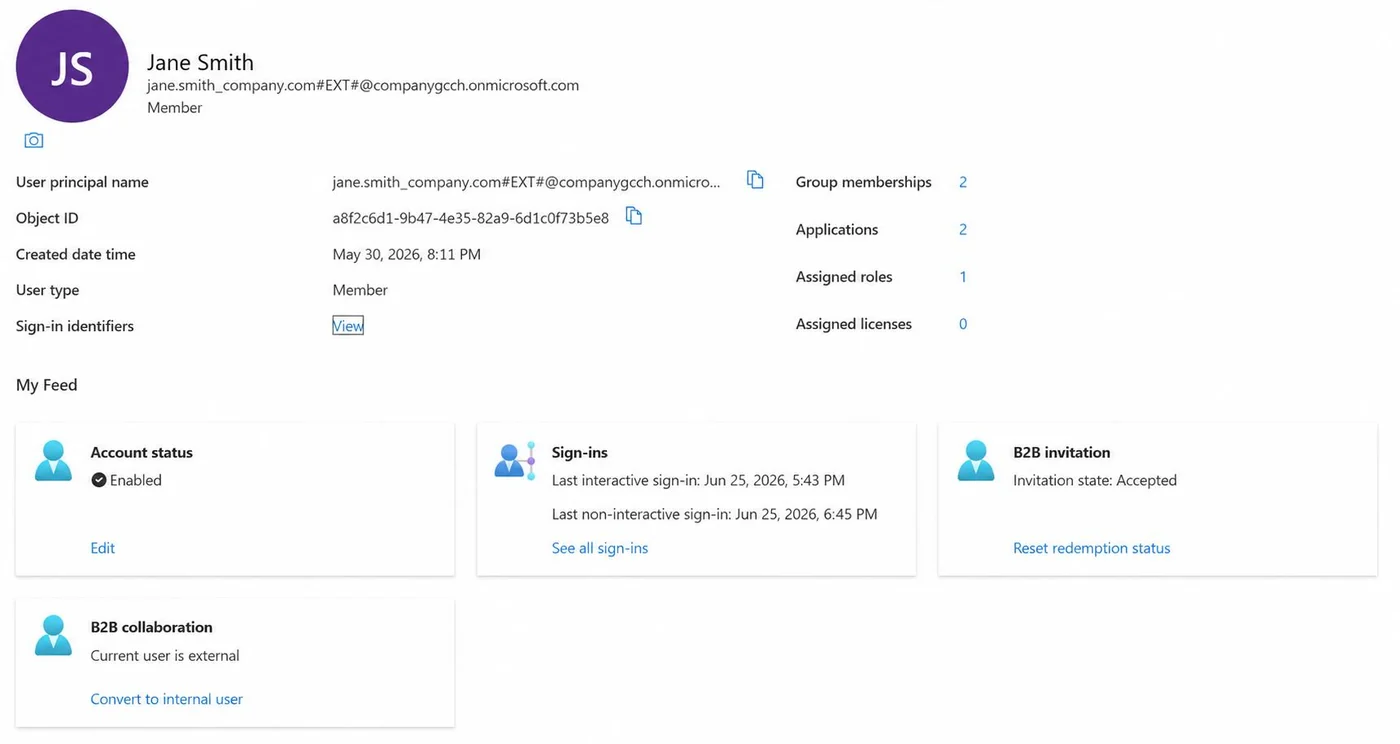
An example Entra ID user, Jane Smith, whose user type is Member while the B2B collaboration panel marks the account as external.
In an organization-owned enclave, accounts that cross-tenant synchronization or other B2B methods add are external identities. This one reads Member, but its B2B collaboration panel, and the #EXT# in its UPN, mark it as external. Identifying details are replaced with example values. From our whitepaper, Figure 11.

Our whitepaper compares the three in detail, with the identity design for an enclave and what changes in Teams, SharePoint, Exchange, Intune, Purview and Defender: The Operational Impact of Microsoft 365 Tenant Selection.

Moving into GCC High

  1. Step 1

    Eligibility

    Microsoft validates that your organization qualifies for GCC High before it sells you a tenant.

  2. Step 2

    New tenant

    Microsoft supports no tenant-to-tenant migration between its clouds, so the GCC High tenant is built new.

  3. Step 3

    Identity and devices

    Entra ID, Conditional Access and Intune, rebuilt. Classic Windows Autopilot is not available in GCC High, so devices enroll through Autopilot device preparation.

  4. Step 4

    Data

    Mail, OneDrive, SharePoint and Teams moved across with migration tooling, in waves.

  5. Step 5

    Cutover

    Mail flow and sign-in switch to the new tenant, and the old one is retired once its retention needs are met.

Tenant configuration

Tenant hardening

Conditional Access, Intune device compliance, and Purview sensitivity labels and data loss prevention, set to what your contracts require. All of them are available in GCC High.

Configuration and control map
Each policy tied to its SP 800-171 or SP 800-53 requirement, for the SSP.

Working with other clouds

Teams chat between GCC High and a commercial tenant is text only, shared channels are unavailable in GCC High, and partners in another cloud cannot sync your SharePoint files to their computers. Guest access and meeting connections have to be set up on both sides. We configure your side and tell your partners what to change on theirs.